

Why Workday Gets Sticky: Compliance, Data Models, Process Lock-In
See why Workday becomes hard to replace: compliance needs, shared HR/finance data models, approvals, reporting, and integrations that create real switching costs.
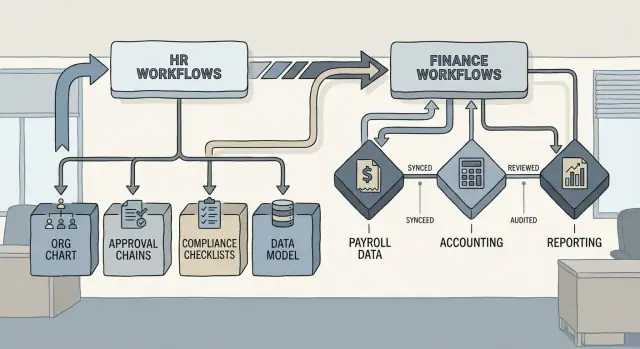
Why Workday Becomes Hard to Replace
“Workday stickiness” usually isn’t about a contract that traps you. It’s about the way a system becomes woven into day-to-day operations until changing it would mean changing how people, data, and decisions move through the company.
Stickiness vs. lock-in
Stickiness is when a platform becomes the default home for critical work because it’s trusted, integrated, and embedded in routines.
Lock-in is when leaving becomes expensive or risky—because too many processes, controls, and dependencies assume that platform’s structure.
Most organizations experience both. Stickiness is often a positive outcome of standardization and consistency. Lock-in shows up the moment you seriously consider replacing the system.
Why HR + finance platforms bind tighter than point tools
A point tool can often be swapped if it affects one team and a narrow workflow. An HR and finance platform is different because it touches:
- Who people are (worker records, job profiles, pay, benefits)
- How money moves (cost centers, budgeting, purchasing, accounting)
- Who can do what (security roles, approvals, segregation of duties)
- What “truth” means (definitions for headcount, FTE, compensation, spend)
When one platform sits in the middle of hiring, payroll, time tracking, expenses, procurement, and financial close, it becomes the shared “operating system” for many teams. Replacing it isn’t just an IT project—it’s coordinated change across HR, finance, and the business.
The three drivers that make switching hard
This article takes a practical, non-technical view of why replacement gets complicated. The main forces are:
- Compliance: audit trails, controls, and regulatory requirements evolve into permanent configuration.
- Data model: shared definitions (jobs, orgs, cost centers, ledger structures) create dependencies across teams and reports.
- Process design: end-to-end workflows (hire-to-pay, procure-to-pay, record-to-report) shape how work gets done—and what downstream systems expect.
If you’re considering expanding your Workday footprint—or questioning whether you should—understanding these three forces clarifies where the real switching costs come from and how to manage them.
The HR–Finance Platform Effect
Workday gets “sticky” fastest when it stops being an HR tool and becomes the shared platform for both people and money. That shift is usually driven by a cluster of anchoring modules—most commonly HCM, Payroll, Financial Management, and Planning (often Adaptive Planning). Each module is useful on its own; together they create a compounding effect that’s hard to unwind.
How modules reinforce each other
Once HCM holds your employee records, downstream systems start treating those records as the canonical truth. Payroll depends on the same worker data (jobs, pay, tax location). Finance depends on the same organizational structure (cost centers, managers, worktags). Planning depends on both to forecast headcount costs.
A simple example: if a department changes its structure, HCM updates reporting lines, Finance updates cost allocations, Payroll updates earning and deduction handling, and Planning updates budgets—all referencing shared definitions. Moving one piece means you must rebuild the connections everywhere else.
Cross-functional ownership spreads dependency
This platform effect isn’t only technical. Ownership becomes cross-functional: HR owns worker lifecycle processes, Finance owns accounting structures and controls, Payroll owns statutory execution, and FP&A owns forecasts. As each group customizes “their” part, dependencies spread across teams, timelines, and governance.
The system-of-record gravity
The deepest lock-in happens when Workday becomes the system of record for:
- People data: identity, job, manager, location, compensation history
- Money data: cost allocation, payroll expense, accruals, budget vs. actuals
At that point, switching isn’t just replacing software—you’re re-defining how the business agrees on who people are, where they sit, and how money follows them.
Compliance Requirements That Turn Into Permanent Configuration
Compliance is one of the quickest ways an HR–finance system stops being “just software” and becomes part of your operating rules. Teams usually start with a straightforward goal—pay people correctly and close the books on time—but the pressure expands as regulations, audits, and internal controls mature.
The compliance pressures that drive permanence
Common requirements include tax and payroll rules (multi-state, multi-country, local filings), labor and employment regulations (leave rules, overtime, works councils), SOX-style financial controls, and privacy obligations like GDPR/CCPA. Each one adds a “must not fail” expectation to how data is captured, approved, stored, and reported.
How requirements turn into configuration and workflows
To satisfy those expectations, organizations encode policies directly into Workday configuration: eligibility rules, validation logic, effective-dating behavior, approval chains, and role-based access. For example, a policy about who can change a job profile becomes a workflow with step conditions, delegated approvers, and compensating controls.
Over time, these choices harden because changing them isn’t only a functional decision—it can trigger payroll re-testing, controls re-validation, and re-training across the business.
Audit evidence becomes a design constraint
Auditors don’t just ask “Is it correct?” They ask for evidence: who approved what, when, under which policy, using which source data. That drives detailed audit trails, segregation of duties, and consistent transaction patterns. Once reporting and evidence expectations are established, deviations become risks.
Recurring audits reinforce standardization
Annual audits, quarterly controls testing, and periodic privacy reviews create a cycle where “known-good” processes are repeated and protected. The safest option becomes keeping configuration stable—even when the business changes—because stability is easier to defend than constant process churn.
The Data Model: Shared Definitions That Bind Teams
A “data model” is the set of fields you store (like Job Profile or Cost Center), how those fields relate to each other (who links to what), and the rules that keep them consistent (what’s required, what’s allowed, what triggers downstream actions).
In Workday, these definitions aren’t just database choices—they become the shared language HR, Finance, IT, and auditors rely on.
A plain-language example of binding relationships
Consider a common chain:
- Worker is assigned to a Position (or job/role structure)
- The Position is tied to a Cost Center (who “pays”)
- The Cost Center maps to a Ledger Account (where the expense lands in the general ledger)
That’s not just reporting. It often drives payroll costing, budget checks, approvals, and accounting entries.
Why definition changes create ripple effects
When you change a definition—rename cost centers, split one cost center into three, or redefine how positions map to accounts—you don’t just “update a field.” You potentially break:
- Reports and analytics, because filters, prompts, and calculated fields assume the old structure
- Integrations, because inbound/outbound feeds may depend on exact IDs, allowed values, or hierarchies
- Approvals and controls, because routing rules frequently use cost center, company, location, worker type, or supervisory org
Even small adjustments can cause “silent” errors: transactions still flow, but land in the wrong place or skip an expected control.
Master data governance is ongoing, not a one-time setup
This is why master data governance matters: clear ownership of key objects (cost centers, companies, job profiles), change approval workflows, naming standards, and a habit of impact analysis before updates.
A practical tip: when governance relies on tribal knowledge, teams often build side tools (intake forms, approval dashboards, integration inventories) to keep changes predictable. A vibe-coding platform like Koder.ai can help internal teams spin up those lightweight workflow and tracking apps quickly—without waiting for a full software project—while still being able to export source code and host under a custom domain.
Security, Roles, and Segregation of Duties
Workday security isn’t just a set of technical permissions—it reflects how your organization is structured. HR partners need access to worker data, finance teams need access to transactions and approvals, managers need visibility into their teams, and auditors need read-only evidence without being able to change anything. Once those roles are mapped, tested, and trusted, they become part of “how work gets done,” which is one reason Workday becomes hard to replace.
Roles that mirror real responsibilities
Most companies end up with a layered model: broad role families (HR, finance, managers, payroll, procurement) and then narrower assignments (by region, business unit, cost center, company, or supervisory org). That structure is convenient—until it’s deeply embedded.
The more precisely you mirror the org chart in security, the more security depends on organizational design decisions, and the more org changes create access work.
Least privilege requires design—and proof
Least-privilege access sounds straightforward: give people only what they need. In practice, it requires careful design and repeated testing because the “need” is often conditional:
- A manager may need compensation visibility only during a review cycle.
- A recruiter may need candidate data but not worker medical details.
- Finance may need to create suppliers but not approve payments.
The testing burden is part of the stickiness. You’re not only validating that people can do their jobs—you’re also proving that they can’t do things they shouldn’t.
Segregation of duties drives non-negotiable controls
In finance especially, segregation of duties (SoD) is a core requirement: the person who creates a vendor shouldn’t also approve payments; the person who initiates an expense shouldn’t be the final approver; payroll changes should be separated from payroll processing. These controls are often audited, meaning “good enough” is rarely acceptable.
Small security tweaks ripple outward
A single security change can affect business processes end-to-end: who can initiate, approve, rescind, correct, or view a transaction. It can also change what appears in reports and dashboards, because reporting frequently respects the same security boundaries.
That ripple effect makes teams cautious about change—and increases the switching costs of moving away from a proven model.
Process Lock-In Through End-to-End Workflows
Workday gets “sticky” not because one feature is hard to copy, but because daily work gets threaded into a single, end-to-end path. Once that path is running, changing systems means re-building not just screens and fields, but the way people coordinate.
A typical flow that turns into muscle memory
A common chain looks like:
Hire → compensation → payroll → GL posting.
At the start, HR enters the worker, job, location, and dates. That triggers downstream rules: eligibility, comp bands, benefit start dates, costing allocations, and pay group selection. Payroll then depends on those upstream choices being consistent, and Finance expects results to land in the right accounts and cost centers.
Where the lock-in forms: approvals, validations, and handoffs
The “lock” is the accumulation of small controls that feel reasonable on their own:
- Approvals: manager sign-off for a hire, compensation partner review for an exception, finance approval for a costing change
- Validations: required fields, effective-dating rules, prevention of conflicting job/comp combinations
- Handoffs: HR initiates, Comp confirms, Payroll executes, Finance reconciles
Over time, those steps become the organization’s version of “how we do things.” People stop thinking of them as Workday steps and start treating them as policy.
How teams adapt to the tool
Once workflows are reliable, teams plan around them: deadlines are set based on approval queues, managers learn which requests get rejected, and HR creates checklists that mirror Workday tasks. Informal behaviors shift too—who escalates what, when “off-cycle” changes are allowed, and which reports are treated as the source of truth.
That’s why replacement is more than migration. You’re asking the business to unlearn routines that reduce risk and keep pay and accounting accurate.
The hidden cost: re-training and re-documenting
A new platform can replicate outcomes, but it still forces re-work: rewriting SOPs, updating audit evidence, retraining managers on approvals, and coaching power users on new exception paths. The effort isn’t only technical; it’s a change management program that touches nearly every role involved in the employee lifecycle and financial close.
Reporting and Analytics That Assume Workday’s Structure
Reporting is where stickiness becomes visible to everyone. A system can be tolerated even if it’s clunky—until executives expect consistent numbers every week, and the organization can’t agree on what those numbers mean.
Consistent definitions become the contract
Workday reporting depends on shared definitions: what counts as headcount, who is active, how FTE is calculated, when a worker is considered terminated, and which cost center hierarchy is “official.” Once those definitions are embedded in calculated fields, report prompts, and security rules, they become the organization’s working contract.
Changing platforms isn’t just moving data; it’s renegotiating those definitions across HR, Finance, and Operations—often while still needing to publish the same outputs on the same cadence.
Dashboards and board reporting as non-negotiable outputs
Executive dashboards and board packs quickly turn into non-negotiable outputs. Leaders don’t want a new story—they want the same KPIs, refreshed on schedule, with explanations that match prior periods.
That pressure typically pushes teams to preserve Workday’s reporting structure, because it already aligns to how the business “talks” about workforce cost, hiring velocity, attrition, and budget vs. actuals.
Time-series needs: trends, history, and audit trails
Analytics rarely focuses on today’s snapshot alone. It depends on time-series history:
- Trend lines (headcount over time, turnover by quarter, backfill cycle time)
- Point-in-time views (org structure as of a prior date)
- Audit trails (who changed what, when, and under which approval)
If a replacement system can’t reproduce history at the same granularity—or can’t explain discrepancies—trust in reporting erodes quickly.
Custom reports become mission-critical artifacts
Custom reports often start as “one-offs” for a VP or a monthly close task. Over time they become mission-critical artifacts: tied to incentives, compliance evidence, workforce planning, and recurring leadership meetings.
Even when documentation is thin, the output becomes the standard—making Workday harder to replace than the underlying transactions.
Integrations That Accumulate Hidden Dependencies
Workday rarely stands alone for long. As soon as it goes live, teams connect it to the rest of the company’s systems—and each connection quietly adds switching costs.
The common integration “web”
Most organizations end up with a mix of:
- Payroll providers (earnings, deductions, taxes, time inputs)
- Banks and payment files (ACH/SEPA, positive pay, account validation)
- ERP add-ons (procurement, expenses, revenue, planning, AP automation)
- Identity and access tools (SSO, SCIM provisioning, MFA platforms)
- BI and data platforms (Snowflake/BigQuery, Power BI/Tableau, ETL tools)
Individually, each integration looks manageable. Together, they form a dependency network that’s hard to fully inventory—especially when a feed was built years ago and “still works.”
Integrations don’t just move data—they encode decisions
Many Workday integrations contain business rules, not just mappings. Examples include how you translate job changes into payroll actions, how you calculate costing splits, how you decide which worker populations trigger benefit eligibility, or how you transform organizational structures into access groups.
Those rules are often scattered across:
- Integration code (Studio, EIBs, middleware)
- Calculated fields and condition rules
- Schedules, effective-dating logic, and exception handling
When you replace Workday, you’re not only rebuilding pipes—you’re rediscovering and re-implementing policy.
Downstream consumers depend on Workday outputs (often silently)
Teams may use Workday exports as “source of truth” for headcount reporting, finance actuals, identity provisioning, IT asset assignments, background checks, or union and compliance reporting. Over time, spreadsheets, scripts, and dashboards start assuming Workday’s field definitions and timing.
If you’re considering major change, start by documenting integrations as products: owners, SLAs, transformations, and consumers. A structured approach (and a checklist) helps—see /blog/hris-migration-checklist.
Historical Data and Migration Gravity
Workday doesn’t just run today’s HR and finance transactions—it becomes the system of record for “what happened” across years of employees, org changes, pay decisions, and accounting outcomes.
That history is hard to give up because audits, benefits disputes, and month/quarter close often hinge on being able to trace a result back to the original records, approvals, and effective dates.
Why the past matters operationally
Historical records are frequently needed to answer practical questions: What was an employee’s eligibility on a specific date? Which job profile and cost center was in effect when a payment was posted? Why did a balance or headcount number shift between two closes?
When Workday holds those timelines (not just current values), it becomes the “court transcript” that people trust.
Data quality: the hidden cost of “just migrate it”
Legacy data is rarely clean. You may find duplicates (two worker IDs for one person), missing fields (no hire reason or FTE), inconsistent effective dates, and structures that changed over time (job families redesigned, cost centers re-numbered, pay components renamed).
Even when data exists, it might not align with how the new system expects to represent it.
What migration actually involves
A realistic migration includes:
- Mapping old fields and codes into the target system’s data model and history rules
- Cleansing and de-duplicating records so reporting doesn’t break on day one
- Validating totals (payroll, balances, headcount) and reconciling exceptions
- Running parallel processes (e.g., close cycles, key HR reports) until results match
Retention and post-cutover access
Regulatory and policy retention requirements can force you to keep access to legacy data long after cutover. If you don’t migrate everything, you’ll still need a plan for secure, searchable access—plus clear guidance on which system is authoritative for which time period.
Operating Model and Governance Reinforce the Status Quo
Workday doesn’t just sit in the background as “software.” Over time, it becomes a managed operating model: who can request changes, who approves them, how releases are planned, and what “good” looks like.
That operational layer is a major reason Workday gets sticky—even when teams complain about limitations.
Configuration becomes “how we operate”
Early decisions (job profiles, supervisory orgs, costing rules, security groups, approval chains) often start as configuration choices made during implementation. A year later, those choices are treated as policy.
People stop asking, “Is this the best process?” and start asking, “How do we make Workday do it?” That shift is subtle, but it hardens the system into the organization’s default way of working.
The governance loop slows change—and makes it safer
As soon as Workday is tied to payroll, close, audits, and compliance, governance becomes formal:
- Change requests are triaged and prioritized
- Updates require testing (including downstream reports and integrations)
- Releases cluster into planned windows to avoid disrupting critical cycles
This is sensible control, but it also creates inertia. When change requires a ticket, a review board, test scripts, and a release calendar, “leave it as-is” becomes the easiest option.
Centers of Excellence deepen institutional memory
Many organizations build an internal HRIS/Workday Center of Excellence. Over time, that team accumulates deep knowledge of edge cases, workarounds, and historical decisions—knowledge that isn’t easily transferable to another platform.
Documentation libraries, training decks, enablement videos, and internal playbooks become valuable assets. The catch: they’re tightly aligned to Workday’s screens, roles, and terminology, so migrating isn’t just moving data—it’s rewriting how people learn and execute work.
When Stickiness Helps—and When It Hurts
Workday’s stickiness isn’t automatically a bad thing. Some of it is healthy standardization: shared definitions, consistent approvals, and a single source of truth that makes audits easier and decisions faster.
The goal is repeatable execution—not freezing the business in place.
Healthy stickiness: standardization that pays you back
Stickiness helps when it reduces ambiguity and rework. Examples include consistent job/position structures, clean cost center hierarchies, and standardized onboarding or close processes that people actually follow.
If teams spend less time debating “which data is right” and more time acting on it, that’s productive stickiness.
Harmful stickiness: rigidity that forces workarounds
Stickiness hurts when the system becomes the reason work slows down. Watch for warning signs:
- “Temporary” spreadsheet trackers that quietly become permanent (especially for headcount, approvals, or allocations)
- Changes that take weeks because ownership is unclear or every edit needs a committee
- Approval bottlenecks where leaders delegate in email because the workflow is too rigid
- Shadow processes (“we do it in Workday, then we do it again in Excel for the real numbers”)
Customization: the hidden tax on change
Customization can feel like progress—until it increases switching costs and upgrade pain. The more you build one-off rules, special workflows, and bespoke reports, the more effort it takes to test releases, retrain users, and explain exceptions to auditors.
Over time, you’re not just operating Workday—you’re operating your unique version of it.
A pragmatic test before saying “yes” to a change
Ask: does this change improve control, speed, or clarity?
If it doesn’t clearly strengthen at least one of those, you’re likely adding friction that will be expensive to unwind later.
Practical Steps to Reduce Risk Before You Double Down
Expanding Workday’s footprint (more countries, more modules, more workflows) can pay off—but it also increases switching costs. Before you add scope, take a few steps that keep your options open without slowing progress.
Create a “lock-in map” (and keep it current)
Document what would be hard to unwind later. A simple spreadsheet is enough—as long as it’s maintained.
Include:
- Processes: hire-to-pay, time entry, close, procure-to-pay, etc.
- Reports & dashboards: who relies on them, where they’re distributed, what decisions they drive
- Integrations: upstream/downstream systems, file formats, schedules, failure handling, owners
- Controls: approval chains, role assignments, audit evidence, key dependencies for compliance
The goal isn’t to scare anyone—it’s to make dependencies visible so you can design around them.
Reduce future switching costs with standards and modularity
You don’t need a “rip-and-replace plan” to be smart about exit risk.
- Define canonical data definitions (worker, cost center, job, supplier) that exist outside any one vendor.
- Use integration patterns you can reuse (API-first where possible; minimize hard-coded transforms).
- Store critical history in an accessible archive and agree on data retention rules independent of Workday.
If your teams keep these artifacts in scattered docs and spreadsheets, consider consolidating them into a simple internal app (integration catalog, data dictionary, control checklist). Tools like Koder.ai are designed for building that kind of internal software quickly via chat—useful when you want lightweight governance tooling without a long development cycle.
Questions to ask before expanding scope
Ask vendors and internal stakeholders:
- Which configurations are easy to change vs. effectively permanent once adopted?
- What new reports will become business-critical—and who will own them long term?
- What is the integration inventory, and what breaks if an endpoint changes?
- Which controls will auditors expect, and what evidence must be preserved?
- Who has decision rights for roles, approvals, and master data?
If you’re evaluating how much to standardize versus customize, you can compare options at /pricing and browse related posts at /blog.
FAQ
What does it mean when people say Workday is “sticky”?
It’s hard to replace because it becomes the shared operating layer for people, money, controls, and reporting. Once hiring, payroll, close, and planning all depend on the same definitions and workflows, replacement turns into coordinated change across HR, Finance, Payroll, IT, and audit—not just a software swap.
What’s the difference between stickiness and lock-in?
Stickiness means teams choose to stay because the platform is trusted, integrated, and embedded in routines.
Lock-in means leaving is risky or expensive because controls, data definitions, integrations, and audit expectations assume the current system’s structure.
Most organizations experience both at the same time.
Why are HR and finance platforms harder to swap than point tools?
Because HR + finance platforms sit at the center of end-to-end flows like hire-to-pay, procure-to-pay, and record-to-report.
Replacing a point tool might affect one team. Replacing a core HR/finance platform forces you to rebuild shared structures (orgs, cost centers, security roles) and re-align multiple departments on timing, approvals, and definitions.
How do Workday modules create a compounding dependency?
HCM, Payroll, Financials, and Planning reinforce each other by sharing “canonical” objects like worker records, org structures, and costing.
A change in one area (like a reorg) can cascade into:
- payroll costing and eligibility rules
- finance allocations and posting
- planning forecasts and budgets
- downstream reporting and dashboards
Why does compliance make configurations feel permanent?
Compliance requirements get encoded into configuration: approval chains, validations, effective-dating behavior, role assignments, and audit trails.
Once auditors and regulators accept a “known-good” process, changing it often means re-testing controls, re-validating payroll/close outcomes, and re-training users—so teams avoid change unless the benefit is clear.
What about the data model makes switching risky?
Because it becomes the shared language that connects teams and systems.
When objects like Worker → Position → Cost Center → Ledger Account drive costing, budget checks, approvals, and GL entries, changing definitions can break reports, integrations, and controls—or cause silent mis-postings that are harder to detect than a hard failure.
How do security roles and segregation of duties add to lock-in?
Workday security is tied to how your organization operates: who initiates, who approves, who can view sensitive data, and what auditors can review.
Security changes can ripple into workflows and reporting, and finance-specific requirements like segregation of duties (SoD) often create non-negotiable role designs that take time to replicate and re-prove in a new system.
What is “process lock-in” in day-to-day terms?
Lock-in forms in the accumulated details: approvals, validations, handoffs, and exception paths that become “muscle memory.”
Even if another platform can reproduce outcomes, you still must redo the operational layer:
- SOPs and training
- exception handling and rework paths
- timing around close and payroll cycles
Why does reporting and analytics make Workday harder to replace?
Because executives expect the same KPIs on the same cadence, with consistent definitions over time (headcount, FTE, attrition, budget vs. actuals).
If a replacement system can’t reproduce time-series history and explain discrepancies with comparable auditability, trust erodes quickly—even if the new tool is technically capable.
What are practical steps to reduce switching risk before expanding Workday?
Start with a practical “lock-in map” you keep current:
- Processes: hire-to-pay, procure-to-pay, close
- Reports: owners, consumers, distribution, decisions driven
- Integrations: endpoints, schedules, transformations, SLAs
- Controls: approval chains, SoD expectations, audit evidence
Then reduce future switching costs by standardizing definitions outside any one vendor and using reusable integration patterns (prefer API-first; minimize hard-coded transforms).