

Zero-downtime schema changes with expand/contract pattern
Plan and ship zero-downtime schema changes with the expand/contract pattern, safe backfills, compatible releases, verification, and rollback.
Why schema changes cause outages
Schema changes cause outages when application versions, background workers, and the database stop agreeing about which structures and values are valid. The failure may be obvious, such as every request returning an error, or gradual, such as rising query latency, failed writes, replica lag, and a queue of jobs that must be replayed.
A production deployment rarely changes every process at once. Rolling releases leave old and new application instances running together. Long-lived workers may keep an older build for hours, mobile clients can remain active for months, and reporting or integration jobs may use tables without going through the main application. All of them share one database.
Common failure modes include:
- New code writes a column before the migration that creates it has completed.
- Old code reads a table or column that a later release renamed or dropped.
- A table rewrite, backfill, or index build consumes enough I/O and CPU to slow normal traffic.
- A schema command waits for a lock while requests pile up behind it.
- A new constraint rejects writes from a process that has not yet been upgraded.
The dangerous part is often lock acquisition, not the nominal execution time. A fast ALTER TABLE can wait behind a long transaction. While it waits, later queries may queue behind the pending schema lock, turning a small migration into an application-wide stall.
Zero downtime requires every intermediate database state to remain usable by every application version that can still run. Add compatible structures first, move traffic and data in controlled steps, and remove the old path only after its final consumer is gone.
This work is justified for systems with live traffic, rolling deployments, strict availability targets, or expensive recovery procedures. A small internal tool with a quiet database may be better served by a tested maintenance window. The decision should reflect the cost of an outage and the operational complexity of the migration.
Expand/contract in plain words
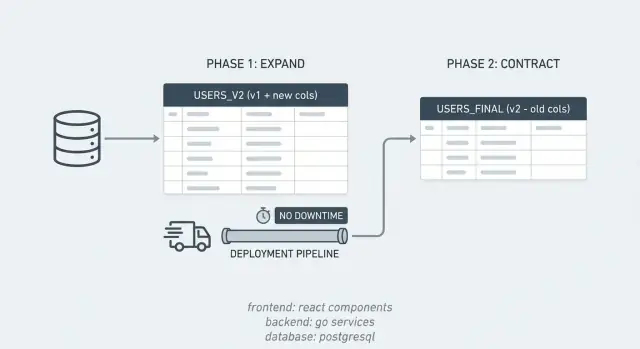
The expand/contract pattern converts one incompatible change into a sequence of compatible releases. The database temporarily supports two representations while code and data move from the old one to the new one.
The sequence has three parts:
- Expand by adding columns, tables, indexes, or constraints without removing anything current code needs.
- Transition by deploying compatible code, moving historical data, and directing reads and writes to the new representation.
- Contract by deleting old code and database objects after verification proves they are unused.
Suppose a PostgreSQL table stores a person's name in full_name, and the application needs separate first_name and last_name fields. Expansion adds nullable columns while preserving full_name. A compatible release writes the representations required during the transition. A backfill separates existing values, with an explicit policy for names that cannot be split reliably. Reads move only after the new fields are sufficiently complete. Contraction later removes full_name.
This order fits rolling deployments because the old build still finds full_name and the new build finds all three columns. It also preserves an application rollback path. If the new release misbehaves, the previous build can run because its schema dependencies have not been removed.
A database rollback is different from an application rollback. Reversing a migration after data has been transformed can discard information or restore an outdated value. During the transition, prefer rolling application traffic back to the known representation while leaving additive database objects in place. Correct the forward migration after the incident is stable.
The pattern does not mean every change needs dual-write code. Adding an optional column that only new code uses may need one additive migration and one deployment. Renames, representation changes, table splits, and changes to required fields usually need more phases because two application versions cannot otherwise share the schema safely.
Classify the change before choosing the steps
The migration plan should match the operation's actual lock, rewrite, compatibility, and data-conversion risks. Treating every ALTER TABLE as equivalent produces either unnecessary ceremony or an unsafe release.
Additive changes are usually easiest. A nullable column, a separate table, or an index created with an online method can often be introduced before application code uses it. The command still needs a lock, so test its behavior against a production-like table and transaction workload.
Destructive changes include dropping or renaming columns, narrowing types, replacing tables, and adding stricter constraints. These changes invalidate an assumption made by existing code. Put them in the contract phase, after code references and external consumers have been removed.
Data-changing operations deserve their own assessment. Converting timestamps, normalizing phone numbers, combining records, or splitting free-form text may lose information. Define how invalid and ambiguous values will be handled before the backfill starts. If a transformation cannot be reversed, preserve the source until the result has passed business-level checks.
A useful preflight review covers five questions:
- Which lock does each statement request, and how long can it wait or hold that lock?
- Will the operation rewrite the table, generate heavy WAL, or increase replica lag?
- Which applications, jobs, reports, and change-data-capture consumers use the affected objects?
- Can both current and proposed releases run against every transitional state?
- What signal pauses the operation, and what exact state remains after it stops?
Run the exact migration on data with realistic volume and distribution. A test table with a thousand tidy rows says little about a production table containing hundreds of millions of rows, wide tuples, dead rows, skewed values, and long-running transactions.
Expand safely in PostgreSQL
A safe PostgreSQL expansion uses short metadata changes, bounded lock waits, and separate online operations where the database requires them. Add the new structure before deploying code that depends on it.
Adding a nullable column without a default is usually a short metadata operation:
BEGIN;
SET LOCAL lock_timeout = '2s';
SET LOCAL statement_timeout = '30s';

ALTER TABLE customers
ADD COLUMN phone_e164 text;

COMMIT;
The timeout prevents the release from waiting indefinitely behind an open transaction. If the lock cannot be acquired promptly, let the migration fail, inspect the blocker, and retry at a safer moment. Do not automatically retry in a tight loop because repeated lock requests can keep disturbing production traffic.
Modern PostgreSQL releases can add a column with a constant default without writing that value into every existing row immediately. That optimization does not make every default harmless. A volatile expression can require a rewrite, and ALTER TABLE still needs a brief ACCESS EXCLUSIVE lock. Confirm the behavior for the deployed PostgreSQL version and the exact expression rather than relying on a general rule.
A normal CREATE INDEX can block writes. Use concurrent creation when the table must remain writable:
CREATE INDEX CONCURRENTLY idx_customers_phone_e164
ON customers (phone_e164);
CREATE INDEX CONCURRENTLY cannot run inside a transaction block. It takes longer, performs extra work, and can wait for older transactions, but normal inserts, updates, and deletes can continue. It still consumes CPU, I/O, and WAL, so monitor database latency and replicas while it runs.
A failed concurrent build may leave an invalid index behind. Inspect the index state before retrying, then remove or rebuild the invalid object deliberately. Migration tools that wrap every file in a transaction need a supported non-transactional mode for concurrent index operations.
New tables are often easier to introduce than in-place transformations. For a one-to-many or many-to-many relationship, add the target table and its indexes while retaining the source column. Delay deletion of the source until new writes, historical data, reads, and downstream consumers have moved.
Type changes require extra care. Some are metadata-only, while others rewrite every row or acquire a restrictive lock for too long. For a risky conversion, add a column with the target type, populate it in batches, switch application access, and drop the original later. This also gives the team a place to record conversion failures instead of making one large ALTER COLUMN TYPE succeed or fail as a unit.
Deploy code that stays compatible
Compatible application code tolerates missing transitional values and never requires a destructive migration during the same rollout. Database expansion should complete before the first application instance starts using the new object.
Dual writing is useful when both representations must remain current. Perform both writes in the same database transaction whenever possible. An asynchronous second write can fail after the first succeeds, creating divergence that later reads may expose.
Dual-write logic also needs one authority. If phone_e164 is derived from phone, define which input wins when both are supplied and apply the same normalization in API handlers, workers, imports, and administrative tools. Otherwise two correct-looking code paths can store different results.
Reads should move later than writes. Keep reads on the established field while new writes populate both forms and the backfill handles historical rows. After verification, deploy a read path that prefers the new field and uses the old value only under a defined fallback rule. Measure fallback use. A fallback that remains silent can hide incomplete data forever.
A typical release sequence is:
- Release 1 adds the new database objects without changing application behavior.
- Release 2 writes the transitional representations while continuing established reads.
- Release 3 switches reads after backfill and consistency checks pass.
- Release 4 stops maintaining the old representation after rollback criteria expire.
- Release 5 removes old code references, followed later by database cleanup.
Keep public API contracts separate from physical schema changes. A renamed database column does not require an immediate field rename in web, mobile, or integration responses. Change those contracts through their own compatibility policy, especially when clients cannot be upgraded with the server.
Inventory every writer. HTTP handlers are only one source of changes. Queue consumers, scheduled jobs, import scripts, data repair tools, database triggers, and direct administrative operations can keep producing old-shaped rows. Tag database connections with an application name where practical, and log use of transitional paths so an overlooked process becomes visible.
Long-lived processes can preserve stale assumptions through prepared statements, cached metadata, or an object-relational mapping layer. Test rolling restarts and connection-pool behavior before contraction. A process that has not issued traffic recently may still fail the first time a rare job runs.
Backfill data without overwhelming the database
A safe backfill updates small, resumable batches and slows down when production health deteriorates. It begins only after live writers can maintain the new representation.
Choose batches by elapsed time and database impact, not by a universal row count. A thousand narrow rows may finish in milliseconds, while a thousand rows containing large values or expensive transformations may produce significant I/O. Start conservatively and aim for transactions that finish in seconds. Commit between batches so locks and old row versions do not accumulate in one transaction.
PostgreSQL does not support ORDER BY and LIMIT directly on a plain UPDATE. Select a batch in a common table expression, then update those rows:
WITH batch AS (
    SELECT id
    FROM my_table
    WHERE id > $1
      AND new_col IS NULL
    ORDER BY id
    LIMIT 1000
)
UPDATE my_table AS target
SET new_col = transform_expression(target.old_col)
FROM batch
WHERE target.id = batch.id
  AND target.new_col IS NULL
RETURNING target.id;
The application records the greatest completed id as its cursor. The conditional update makes reruns idempotent, so a crash after commit does not corrupt already processed rows. Store progress with enough care that the cursor cannot advance past an uncommitted batch.
An increasing id cursor avoids repeatedly scanning the beginning of the table, but it does not catch late corrections or rows inserted below the cursor. Finish with a catch-up pass over all remaining NULL values. If identifiers are not ordered or rows can move between eligibility states, use a work table or another explicit checkpoint rather than assuming one forward scan is complete.
Multiple workers can claim rows with FOR UPDATE SKIP LOCKED, but parallelism increases write pressure and complicates progress tracking. Do not combine skipped rows with a cursor that permanently advances past them. A queue of claimed identifiers or repeated eligibility scan is safer for parallel workers.
Throttle on production measurements such as query latency, active connections, lock waits, WAL generation, replica replay delay, and dead-row growth. Pause when a threshold is crossed, then resume from the checkpoint. Fixed sleeps are simple, but feedback from the database responds better to traffic changes.
Avoid changing every row when only some need work. Filter on the new field, the source state, or a migration marker. If the transformation is expensive, calculate it outside the update transaction where consistency permits, then issue a short conditional write. Keep a count and sample of rejected values rather than silently inventing data.
Autovacuum and replicas must absorb the work after each update. A backfill can finish successfully on the primary while replicas fall far behind or table bloat degrades later queries. Rate limits should account for that delayed cost, not just the batch's immediate execution time.
Verify data and production traffic
A migration is ready for contraction only when data checks, application telemetry, and dependency evidence agree that the new path is authoritative. A completed job counter alone does not prove correctness.
Start with completeness and consistency. PostgreSQL's IS DISTINCT FROM compares values while handling NULL explicitly, unlike <>, which produces an unknown result when either side is NULL:
SELECT count(*)
FROM customers
WHERE normalize_phone(phone) IS DISTINCT FROM phone_e164;
Do not run an unindexed full-table count repeatedly on a busy, very large table. Use a one-time controlled validation, bounded identifier ranges, samples, or a temporary verification process that advances through the table. The right method depends on the cost of being wrong and the available database headroom.
Verification should cover:
- No unexpected missing values remain in rows that require the new field.
- The new value matches the agreed transformation, including malformed and empty inputs.
- Fresh rows and updates remain consistent after the historical pass finishes.
- Read fallback use has reached the planned threshold, usually zero for server-controlled traffic.
- Error rates, query latency, locks, and replica delay remain within release limits.
Compare business outcomes as well as columns. If a migration changes prices, permissions, account state, or identifiers, validate totals and invariants that users depend on. Two columns can match mechanically while both encode the wrong business rule.
Observe a full operating cycle before cleanup. The correct interval is based on actual system behavior, not a fixed one-week rule. It may need to include month-end processing, an infrequent billing job, delayed queue retries, or the maximum lifetime of an older mobile client. Record the evidence that each consumer has moved.
Canary the read switch when the application architecture permits it. Send a small portion of traffic to the new read path, compare results, and expand gradually. Keep the rollback action simple: redirect reads to the established representation without reversing the backfill.
Add constraints after data is ready
Constraints should become strict only after all writers comply and existing data has been validated. Enforcing NOT NULL, a check, or a foreign key during expansion can block traffic or reject writes from an older process.
PostgreSQL can add a check constraint as NOT VALID, which enforces the rule for new or changed rows without immediately scanning every historical row. Validate it separately after the backfill:
ALTER TABLE customers
ADD CONSTRAINT customers_phone_e164_present
CHECK (phone_e164 IS NOT NULL) NOT VALID;

ALTER TABLE customers
VALIDATE CONSTRAINT customers_phone_e164_present;
Once validation succeeds, supported PostgreSQL releases can use that proof when setting the column to NOT NULL, avoiding another full table scan. The final alteration still needs a strong table lock, so use a bounded lock timeout and retry plan:
ALTER TABLE customers
ALTER COLUMN phone_e164 SET NOT NULL;

ALTER TABLE customers
DROP CONSTRAINT customers_phone_e164_present;
The temporary check can remain if it has value, but keeping equivalent constraints adds catalog clutter without changing the rule.
Foreign keys can follow a similar sequence with NOT VALID and VALIDATE CONSTRAINT. New writes are checked after the constraint is created, while historical validation happens later. Add the supporting index intentionally when delete or update behavior on the referenced relationship would otherwise cause expensive scans.
Application validation should precede database enforcement, but it does not replace it. Code produces clearer user-facing errors, while the database protects data written by every path. During rollout, watch constraint violations to identify a writer that the dependency audit missed.
Contract the old path safely
The contract phase should remove application dependencies before it removes database objects. Once telemetry and verification establish that the new path is authoritative, cleanup can proceed through separate releases.
First stop reading the old field and remove fallback logic. Then disable its writes and observe production long enough to catch rare paths. Remove feature flags, triggers, compatibility views, repair scripts, and scheduled jobs that mention the old representation. Search exported source and migration code, but also inspect reports, integration queries, and change-data-capture configurations outside the main repository.
A safe cleanup order is:
- Remove fallback reads and confirm they no longer appear in telemetry.
- Stop old writes and delete synchronization code.
- Remove application references from all deployable versions.
- Drop obsolete indexes and constraints with the appropriate online method.
- Drop the old column or table in a later database release.
Dropping a PostgreSQL column is primarily a catalog change, but it still requires an ACCESS EXCLUSIVE lock. A short statement can therefore wait behind a long transaction and block later work. Apply a lock timeout, inspect long-running transactions beforehand, and schedule the attempt during a lower-risk period.
Use DROP INDEX CONCURRENTLY for an obsolete index when blocking writes would be unacceptable. Like concurrent creation, it cannot run inside a transaction block and has restrictions that migration tooling must handle.
Do not combine code cleanup and the physical drop in one release. Separation lets the cleaned application run against a database that still contains the unused object. If an application problem appears, rollback remains possible without recreating schema or reconstructing data.
Before dropping a table, check ownership of sequences, views, functions, grants, triggers, replication publications, and external queries. Avoid CASCADE as a shortcut in a production migration because it can remove dependencies that were not part of the intended change.
Handle rollback and failed steps
Rollback planning should define a safe action for each phase instead of relying on one generic down migration. Additive objects, data movement, read switches, and deletion have different recovery properties.
If expansion fails to acquire its lock, leave the application unchanged and retry after resolving the blocking transaction. If a concurrent index build fails, inspect whether it left an invalid index and clean up that specific object before another attempt.
If a backfill creates load, pause it. Already committed, idempotent batches can remain in place. Lower the batch size or rate, address the expensive transformation, and resume from the checkpoint. Reverting millions of correct updates usually adds risk without helping production recover.
If a new read path returns incorrect results, direct reads back to the old representation while retaining the new data for diagnosis. Continue dual writes only if they are known to be correct. When the writer itself is faulty, disable it or roll back the application before repairing affected rows.
After contraction, recovery may require restoring data rather than merely deploying an older build. Define the point of no return explicitly. Take the backup or snapshot required by the system's recovery policy, test restoration before the release, and keep the old object for the agreed retention interval when storage cost permits.
Schema commands may be transactional, but external effects are not always covered. Concurrent index operations, queue messages, cache changes, and application deployments do not share one atomic transaction. The runbook should describe the observable state after each partial failure and the command that safely continues from it.
Avoid common migration traps
Most failed zero-downtime migrations either enforce the new state too soon or forget a consumer of the old state. The following traps deserve an explicit review before approval.
- Adding
NOT NULLwhile an old application instance can still omit the field. - Running a large backfill in one transaction, retaining locks and row versions for too long.
- Renaming a column as if it were additive, even though old code still uses its original name.
- Switching reads before all write paths and historical rows populate the new representation.
- Treating successful deployment as proof that reports, workers, replicas, and integrations are compatible.
Another subtle failure comes from bidirectional synchronization. A trigger copies old_col to new_col, while application code copies new_col back to old_col. Differences in normalization or trigger order can create loops, overwrite intentional values, or make ownership unclear. Prefer a single direction and document which representation is authoritative during each release.
Defaults can hide missing writer updates. If a new required column receives an empty or generic default, old code appears compatible while storing semantically invalid data. Use a nullable transition when absence carries useful diagnostic information, then enforce the real rule after every writer supplies a meaningful value.
A feature flag does not make an incompatible schema command safe by itself. A disabled code path may still be loaded, prepared, or run by an older process. The database object must remain until no deployable or active version references it.
Migration ownership also matters. Assign one person or team to the transition through contraction, including verification and removal dates. Otherwise temporary columns, flags, and synchronization jobs can remain for months, increasing the cost of every later change.
Replace a phone column without downtime
Replacing customers.phone with normalized customers.phone_e164 requires an additive column, a defined conversion policy, compatible code, a bounded backfill, a read switch, and delayed cleanup. The conversion policy must come before SQL because not every stored value can be normalized automatically.
Start by classifying existing values. Valid numbers can be converted when the required country context is known. Blank values may become NULL. Ambiguous or malformed numbers should enter an exception report rather than being guessed. Decide whether the product requires every customer to have a phone number, since that determines whether NOT NULL is appropriate later.
Add the column with a short lock timeout:
BEGIN;
SET LOCAL lock_timeout = '2s';

ALTER TABLE customers
ADD COLUMN phone_e164 text;

COMMIT;
Deploy code that normalizes new input and writes phone and phone_e164 in one transaction. Keep reads on phone initially. Update every writer, including account imports, support tools, worker jobs, and tests that create customer fixtures.
Backfill eligible rows in short transactions. Record the last processed identifier, the number converted, the number skipped, and the reason for each failure category. Rate-limit the job against production latency and replica delay. Once the forward pass completes, rescan for eligible NULL values to catch concurrent inserts or rows missed after a restart.
Run consistency checks using the same normalization rules as the application, then manually sample international prefixes, extensions, blanks, duplicate contact records, and old imported data. A row count proves coverage but not a correct telephone number.
Deploy a read path that returns phone_e164 when present and uses phone only for a logged exception. Monitor fallback use and normalization errors. Resolve the remaining exceptions instead of letting fallback become permanent behavior.
When the new field is authoritative, remove the fallback and stop writing phone. Observe rare jobs and integration traffic through an appropriate operating cycle. Add the validated constraint only if the product rule requires it.
Finally, remove code references to phone. Drop its indexes or constraints separately, then drop the column in a later migration with a bounded lock wait. If the read switch fails at any point before that drop, roll back the application behavior while both columns remain available.
This example also exposes a domain issue that schema mechanics cannot solve: splitting or normalizing human-entered data is not always lossless. The migration plan must preserve exceptions and give an owner a way to resolve them.
Check each release before it ships
A release checklist should prove compatibility, bound production impact, and name the recovery action for the current phase. Keep the evidence with the change so an operator does not have to reconstruct intent during an incident.
Before deployment, confirm:
- The application version works with the database state before and after this release.
- Lock and statement timeouts are set for schema commands that could wait behind traffic.
- The backfill or validation job has progress, pause, resume, and rate-limit controls.
- Dashboards cover errors, latency, locks, database load, WAL, and replica delay.
- The rollback action has been tested without depending on an already removed object.
Record explicit completion conditions. Examples include zero new consistency failures for a full job cycle, zero fallback reads from server-controlled traffic, every known consumer upgraded, and a successful controlled validation query. Percent complete is useful during a backfill, but 100 percent processed is not the same as 100 percent correct.
Review migration ordering independently from code review. A correct collection of SQL and application changes can still fail if deployment executes them in the wrong sequence. State which step is allowed to begin only after another has completed.
Stop conditions should be numerical where possible. Define acceptable query latency, lock wait, replica delay, error rate, and batch duration. When a threshold is crossed, the operator should know whether to pause a job, cancel a waiting statement, or redirect reads without seeking fresh approval during the incident.
The migration is complete only after the new representation handles reads and writes, historical data has passed verification, the old object is removed, and temporary operational machinery is gone.
Make the process repeatable
A reusable migration runbook turns expand/contract into ordinary release work with named owners and measurable gates. It should be short enough to follow during a live deployment and specific enough to describe partial failure states.
Use five sections in the runbook:
- Expansion: exact schema operations, expected locks, timeouts, and transaction requirements.
- Compatibility: affected code, writers, readers, flags, clients, and deployment order.
- Backfill: transformation policy, batching, checkpoints, throttling, and exception handling.
- Verification: SQL checks, business invariants, telemetry, and completion thresholds.
- Contraction: dependency removal, observation period, physical cleanup, and recovery limits.
Assign an owner and expected completion date to every transitional object. Track columns, indexes, flags, triggers, and jobs in the same place. Cleanup is part of the migration, not optional maintenance.
For teams building with Koder.ai, Planning Mode can be used to spell out these phases and checkpoints before production changes begin. Source code export also allows the migration SQL and compatibility logic to receive the same review as other application code. Koder.ai supports deployment, hosting, snapshots, and rollback, but an application rollback should not be assumed to reverse a committed data transformation. Preserve schema compatibility until the database recovery plan no longer depends on the old representation.
Schedule write-heavy work during lower traffic when possible, but do not use timing as the only safety control. Bounded transactions, feedback-based throttling, observable progress, and a tested pause action are what keep an online migration manageable when traffic or data behaves differently than expected.
FAQ
Why can a schema change cause an outage?
Schema changes break production when old and new application versions expect different database structures. During a rolling deployment, both versions can run at the same time, so removing or renaming a column too early can cause failed reads or writes.
What is the expand/contract migration pattern?
Expand/contract splits an incompatible change into safe stages. First add the new structure, then move code and data to it, and only later remove the old structure after every consumer has stopped using it.
How do I rename or replace a database column without downtime?
Add the new column first and keep the old column in place. Deploy code that can work with both fields, backfill existing rows in small batches, switch reads after validation, and drop the old column in a later release.
Can I add a PostgreSQL column without blocking traffic?
Usually, yes. A nullable column without a default is often a short metadata change in PostgreSQL, but it still needs a table lock. Set a short lock timeout so the migration fails instead of waiting behind a long transaction.
How can I create an index without blocking writes?
Use CREATE INDEX CONCURRENTLY when the table must stay writable. It takes longer and adds database load, and it cannot run inside a transaction block, so monitor latency, WAL, and replica delay while it runs.
When should an application dual write old and new fields?
Write both values in the same database transaction whenever both representations must stay current. Define which field wins if they disagree, and use the same normalization rules in APIs, workers, imports, and support tools.
How should I backfill a large PostgreSQL table safely?
Process short, resumable batches and commit after each batch. Store a checkpoint, update only rows that still need work, and slow or pause the job when query latency, lock waits, WAL volume, or replica lag rises.
How do I know a backfill is complete and correct?
Do not switch reads just because the backfill finished. Check that required values exist, compare old and new representations, monitor fallback reads, and confirm that new writes stay consistent after the historical data pass.
When should I add NOT NULL, check constraints, or foreign keys?
Add strict constraints after existing data passes validation and every active writer supplies valid values. PostgreSQL lets you add some constraints as NOT VALID, enforce them for new rows, and validate historical rows separately.
When is it safe to remove the old schema path?
Remove fallback reads first, then stop old writes and observe the system through a full operating cycle. After all applications, jobs, reports, integrations, and clients no longer reference the old object, remove related code and drop the database column or table in a later release.