

ZSTD vs Brotli vs GZIP: Choosing API Compression
Compare ZSTD, Brotli, and GZIP for APIs: speed, ratio, CPU cost, and practical defaults for JSON and binary payloads in production.
What API Compression Is (and When It’s Worth It)
API response compression means your server encodes the response body (often JSON) into a smaller byte stream before sending it over the network. The client (browser, mobile app, SDK, or another service) then decompresses it. Over HTTP, this is negotiated through headers like Accept-Encoding (what the client supports) and Content-Encoding (what the server chose).
What it does for APIs
Compression mainly buys you three things:
- Less bandwidth: Smaller responses consume fewer bytes end-to-end.
- Lower latency on constrained links: Fewer bytes often means faster downloads on mobile, congested Wi‑Fi, and cross-region calls.
- Lower egress cost: If you pay for outbound data, reducing transfer size can directly reduce bills.
The trade-off is straightforward: compression saves bandwidth but costs CPU (compress/decompress) and sometimes memory (buffers). Whether it’s worth it depends on your bottleneck.
When compression helps the most
Compression tends to shine when responses are:
- Text-heavy and repetitive, like JSON, GraphQL responses, HTML, or logs.
- Medium to large, where shaving tens or hundreds of kilobytes matters.
- Served over slow or expensive networks, such as mobile, international clients, or cross-region traffic.
If you return large JSON lists (catalogs, search results, analytics), compression is often one of the easiest wins.
When it helps the least
Compression is often a poor use of CPU when responses are:
- Tiny (for example, a few hundred bytes). Header + CPU overhead can outweigh the savings.
- Already compressed (JPEG/PNG, MP4, ZIP, many PDFs). Re-compressing usually yields little reduction and can even increase size.
- CPU-bound services (hot endpoints already struggling with compute). Adding compression can increase tail latency.
The decision axes you’ll use throughout this guide
When choosing between ZSTD vs Brotli vs GZIP for API compression, the practical decision usually comes down to:
- Size reduction (compression ratio)
- Latency (server time-to-first-byte plus client decode)
- Client support (what your callers and intermediaries reliably handle)
Everything else in this article is about balancing those three for your particular API and traffic patterns.
ZSTD vs Brotli vs GZIP: Quick Comparison
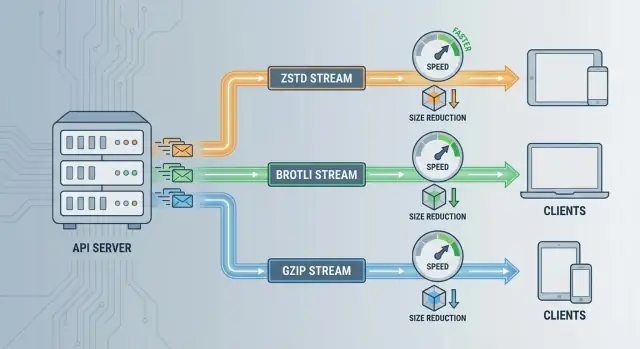
All three reduce payload size, but they optimize for different constraints—speed, compression ratio, and compatibility.
One-view summary
- ZSTD (Zstandard): Often the best balance for APIs when you care about low latency and predictable CPU. Strong ratio without being slow.
- Brotli: Often wins on smallest bytes over the wire, especially for text-heavy responses (JSON, HTML-like content). Higher settings can cost more CPU.
- GZIP: The “works everywhere” option. Widely supported and easy to operationalize, but typically slower and/or larger than modern alternatives at comparable CPU budgets.
Typical strengths (and what that means for APIs)
ZSTD speed: Great when your API is sensitive to tail latency or your servers are CPU-bound. It can compress fast enough that the overhead is often negligible compared to network time—especially for medium-to-large JSON responses.
Brotli compression ratio: Best when bandwidth is the primary constraint (mobile clients, expensive egress, CDN-heavy delivery) and responses are mostly text. Smaller payloads can be worth it even if compression takes longer.
GZIP compatibility: Best when you need maximum client support with minimal negotiation risk (older SDKs, embedded clients, legacy proxies). It’s a safe baseline even if it isn’t the top performer.
What “compression level” really changes
Compression “levels” are presets that trade CPU time for smaller output:
- Lower levels: Faster compression, larger payloads. Good for real-time APIs.
- Higher levels: Smaller payloads, slower compression (and sometimes more memory). Better for large, cacheable responses.
Decompression is usually much cheaper than compression for all three, but very high levels can still increase client CPU/battery—especially important for mobile.
Simple rule of thumb
- Default choice: Use ZSTD for most JSON/REST/GraphQL APIs where latency matters.
- Switch to Brotli: When you’re optimizing for minimum bytes (text-heavy responses, CDN delivery, slow networks) and you can afford extra CPU.
- Stick with GZIP: When you need broad compatibility or your infrastructure/tooling doesn’t support newer encodings.
Compression Ratio vs Latency: The Core Trade-Off
Compression is often sold as “smaller responses = faster APIs.” That’s frequently true on slow or expensive networks—but it’s not automatic. If compression adds enough server CPU time, you can end up with slower requests despite fewer bytes on the wire.
Where the time goes
It helps to separate two costs:
- Compression time (server-side): work done before the server can start sending bytes. This can directly add to response time (TTFB).
- Decompression time (client-side): work done after receiving bytes. Usually cheaper than compression, but can matter on low-powered devices or high-throughput clients.
A high compression ratio can reduce transfer time, but if compression adds (say) 15–30 ms of CPU per response, you may lose more time than you save—especially on fast connections.
The tail-latency trap under load
Under load, compression can hurt p95/p99 latency more than p50. When CPU usage spikes, requests queue. Queueing amplifies small per-request costs into big delays—average latency looks fine, but the slowest users suffer.
Measure it like a performance feature
Don’t guess. Run an A/B test or staged rollout and compare:
- p50 and p95 latency (and ideally p99)
- CPU utilization and saturation on API instances
- Response sizes and time-to-first-byte
Test with realistic traffic patterns and payloads. The “best” compression level is the one that reduces total time, not just bytes.
CPU and Memory Costs on Server and Client
Compression isn’t “free”—it shifts work from the network to CPU and memory on both ends. In APIs, that shows up as higher request handling time, larger memory footprints, and sometimes client-side slowdowns.
Where the CPU is spent
Most CPU is spent compressing responses. Compression finds patterns, builds state/dictionaries, and writes encoded output.
Decompression is typically cheaper, but still relevant:
- Servers may decompress requests (rare for JSON APIs, more common for uploads or batched events).
- Clients decompress responses on the critical path before parsing JSON.
If your API is already CPU-bound (busy app servers, heavy auth, expensive queries), turning on a high compression level can increase tail latency even if payloads shrink.
Memory considerations
Compression can increase memory use in a few ways:
- Buffers: implementations may need input/output buffers; larger payloads mean larger buffers.
- Full buffering vs streaming: streaming compression can start sending earlier and keep memory flatter, while full buffering can inflate peak memory per request.
In containerized environments, higher peak memory can translate into more OOM kills or tighter limits that reduce density.
Impact on autoscaling and container limits
Compression adds CPU cycles per response, reducing throughput per instance. That can trigger autoscaling sooner, raising costs. A common pattern: bandwidth drops, but CPU spend rises—so the right choice depends on which resource is scarce for you.
Why decompression speed matters for clients
On mobile or low-power devices, decompression competes with rendering, JavaScript execution, and battery. A format that saves a few KB but takes longer to decompress can feel slower, particularly when “time to usable data” matters.
ZSTD for APIs: Strengths, Limits, and Good Defaults
Zstandard (ZSTD) is a modern compression format designed to deliver a strong compression ratio without slowing your API down. For many JSON-heavy APIs, it’s a strong “default”: noticeably smaller responses than GZIP at similar or lower latency, plus very fast decompression on clients.
What ZSTD is best at
ZSTD is most valuable when you care about end-to-end time, not just smallest bytes. It tends to compress quickly and decompress extremely quickly—useful for APIs where every millisecond of CPU time competes with request handling.
It also performs well across a wide range of payload sizes: small-to-medium JSON often sees meaningful gains, while large responses can benefit even more.
Sensible compression levels for APIs
For most APIs, start with low levels (commonly level 1–3). These often provide the best latency/size trade-off.
Use higher levels only when:
- Payloads are large (hundreds of KBs to MBs)
- Bandwidth is expensive or constrained
- You’ve measured that CPU isn’t the bottleneck
A pragmatic approach is a low global default, then selectively increase the level for a few “big response” endpoints.
Streaming and dictionary mode
ZSTD supports streaming, which can reduce peak memory and start sending data sooner for large responses.
Dictionary mode can be a big win for APIs that return many similar objects (repeated keys, stable schemas). It’s most effective when:
- Payloads are relatively small but frequent
- You can manage versioned dictionaries safely
Compatibility limits to watch
Server-side support is straightforward in many stacks, but client compatibility can be the deciding factor. Some HTTP clients, proxies, and gateways still don’t advertise or accept Content-Encoding: zstd by default.
If you serve third-party consumers, keep a fallback (usually GZIP) and enable ZSTD only when Accept-Encoding clearly includes it.
Brotli for APIs: When It Wins and When It Doesn’t
Brotli is designed to squeeze text extremely well. On JSON, HTML, and other “wordy” payloads, it often beats GZIP on compression ratio—especially at higher compression levels.
Where Brotli wins
Text-heavy responses are Brotli’s sweet spot. If your API sends large JSON documents (catalogs, search results, configuration blobs), Brotli can cut bytes noticeably, which helps on slow networks and can reduce egress cost.
Brotli is also strong when you can compress once and serve many times (cacheable responses, versioned resources). In those cases, high-level Brotli can be worth it because the CPU cost is amortized.
Where Brotli disappoints
For dynamic API responses (generated on every request), Brotli’s best ratios often require higher levels that can be CPU-expensive and add latency. Once you account for compression time, the real-world win over ZSTD (or even a well-tuned GZIP) may be smaller than expected.
It’s also less compelling for payloads that don’t compress well (already-compressed data, many binary formats). In those cases you just burn CPU.
Practical level guidance
- Runtime compression: use low levels (commonly 1–4) to avoid CPU spikes.
- Precompressed/static: higher levels (often 8–11) can be worth it when amortized over many requests.
Client support notes
Browsers generally support Brotli well over HTTPS, which is why it’s popular for web traffic. For non-browser API clients (mobile SDKs, IoT devices, older HTTP stacks), support can be inconsistent—so negotiate correctly via Accept-Encoding and keep a fallback (typically GZIP).
GZIP for APIs: Compatibility and Practical Performance
GZIP remains the default answer for API compression because it’s the most universally supported option. Nearly every HTTP client, browser, proxy, and gateway understands Content-Encoding: gzip, and that predictability matters when you don’t fully control what sits between your server and your users.
Why it remains common
The advantage isn’t that GZIP is “best”—it’s that it’s rarely the wrong choice. Many organizations have years of operational experience with it, sensible defaults in their web servers, and fewer surprises with intermediaries that might mishandle newer encodings.
Practical compression levels for APIs
For API payloads (often JSON), mid-to-low compression levels tend to be the sweet spot. Levels like 1–6 commonly deliver most of the size reduction while keeping CPU reasonable.
Very high levels (8–9) can squeeze out a bit more, but the extra CPU time usually isn’t worth it for dynamic request/response traffic where latency matters.
How it compares on modern CPUs
On modern hardware, GZIP is generally slower than ZSTD at similar compression ratios, and it often can’t match Brotli’s best ratios on text payloads. In real API workloads, that typically means:
- ZSTD often wins on speed-per-byte-saved.
- Brotli can win on size for highly compressible text, but may cost more CPU depending on settings.
- GZIP stays competitive because it’s “fast enough” and heavily optimized across stacks.
Compatibility edge cases (older clients and intermediaries)
If you have to support older clients, embedded devices, strict corporate proxies, or legacy gateways, GZIP is the safest bet. Some intermediaries will strip unknown encodings, fail to pass them through, or break negotiation—issues that are much less common with GZIP.
If your environment is mixed or uncertain, starting with GZIP (and adding ZSTD/Brotli only where you control the full path) is often the most reliable rollout strategy.
Payload Types: What Compresses Well (and What Doesn’t)
Compression wins aren’t just about the algorithm. The biggest driver is the kind of data you send. Some payloads shrink dramatically with ZSTD, Brotli, or GZIP; others barely move and just burn CPU.
Great candidates (high payoff)
Text-heavy responses tend to compress extremely well because they contain repeated keys, whitespace, and predictable patterns.
- JSON (including typical REST responses)
- GraphQL responses (often verbose with repeated field names)
- XML and HTML
- Large plain-text logs and error traces returned by APIs
As a rule, the more repetition and structure, the better the compression ratio.
Binary payloads: “maybe” (measure first)
Binary formats like Protocol Buffers and MessagePack are more compact than JSON, but they aren’t “random.” They can still contain repeated tags, similar record layouts, and predictable sequences.
That means they’re frequently still compressible, especially for larger responses or list-heavy endpoints. The only reliable answer is to test with your real traffic: same endpoint, same data, compression on/off, and compare both size and latency.
Usually not worth compressing (already compressed)
Many formats are already compressed internally. Applying HTTP response compression on top typically gives tiny savings and can increase response time.
- Images: JPEG, PNG, WebP
- Video/audio: MP4 (and similar)
- Archives: ZIP, gzip files
- PDF: often already uses compression
For these, it’s common to disable compression by content type.
Practical heuristics (keep it simple)
A straightforward approach is to compress only when responses cross a minimum size.
- Set a minimum response size threshold (for example, a few KB) before enabling
Content-Encoding. - Always compress large text responses; consider skipping compression for small JSON where headers dominate.
This keeps CPU focused on payloads where compression actually reduces bandwidth and improves end-to-end performance.
HTTP Headers and Negotiation: Getting It Right
Compression only works smoothly when clients and servers agree on an encoding. That agreement happens through Accept-Encoding (sent by the client) and Content-Encoding (sent by the server).
Accept-Encoding and Content-Encoding (simple examples)
A client advertises what it can decode:
GET /v1/orders HTTP/1.1
Host: api.example
Accept-Encoding: zstd, br, gzip
The server picks one and declares what it used:
HTTP/1.1 200 OK
Content-Type: application/json
Content-Encoding: zstd
If the client sends Accept-Encoding: gzip and you respond with Content-Encoding: br, that client may fail to parse the body. If the client sends no Accept-Encoding, the safest default is to send no compression.
Choosing a server-side priority order
A practical order for APIs is often:
zstdfirst (great speed/ratio balance)- then
br(often smaller, sometimes slower) - then
gzip(widest compatibility)
In other words: zstd > br > gzip.
Don’t treat this as universal: if your traffic is mostly browsers, br may deserve higher priority; if you have older mobile clients, gzip might be the safest “best” choice.
Vary: Accept-Encoding and caching
If a response can be served in multiple encodings, add:
Vary: Accept-Encoding
Without it, a CDN or proxy might cache the gzip (or zstd) version and incorrectly serve it to a client that didn’t ask for (or can’t handle) that encoding.
Edge cases and safe fallbacks
Some clients claim support but have buggy decoders. To stay resilient:
- Prefer a known-good fallback: if decoding errors spike for
zstd, temporarily fall back togzip. - Consider allowlists for “problem” user agents or SDK versions.
- For critical endpoints (auth, webhooks), consider disabling compression or using only the most compatible option.
Negotiation is less about squeezing every byte and more about never breaking a client.
HTTP/2, HTTP/3, CDNs, and Gateways
API compression doesn’t run in a vacuum. Your transport protocol, TLS overhead, and any CDN or gateway in between can change the real-world outcome—or even break things if misconfigured.
HTTP/2 and HTTP/3: multiplexing, head-of-line, and what compression changes
With HTTP/2, multiple requests share a single TCP connection. That reduces connection overhead, but packet loss can stall all streams due to TCP head-of-line blocking. Compression can help by shrinking response bodies, reducing the amount of data “stuck” behind a loss event.
HTTP/3 runs over QUIC (UDP) and avoids TCP-level head-of-line blocking between streams. Payload size still matters, but the loss penalty is often less dramatic per connection. In practice, compression remains valuable—expect benefits to show up more as bandwidth savings and faster “time to last byte” than as dramatic latency drops.
TLS interaction: don’t ignore CPU budgets
TLS already consumes CPU (handshakes, encryption/decryption). Adding compression (especially at high levels) can push you over CPU limits during spikes. This is why “fast compression with decent ratio” settings often outperform “maximum ratio” in production.
CDNs and API gateways: auto-compress, pass-through, or strip
Some CDNs/gateways automatically compress certain MIME types, while others pass through what the origin sends. A few may normalize or even remove Content-Encoding if misconfigured.
Verify behavior per route, and ensure Vary: Accept-Encoding is preserved so caches don’t serve a compressed variant to a client that didn’t ask for it.
Caching strategy: edge vs origin (and multiple variants)
If you cache at the edge, consider storing separate variants per encoding (gzip/br/zstd) rather than recompressing on every hit. If you cache at origin, you may still want the edge to negotiate and cache multiple encodings.
The key is consistency: correct Content-Encoding, correct Vary, and clear ownership of where compression happens.
Recommended Defaults and Tuning Playbook
Suggested defaults by scenario
For browser-facing APIs, prefer Brotli when the client advertises it (Accept-Encoding: br). Browsers generally decode Brotli efficiently, and it often delivers better size reduction on text responses.
For internal service-to-service APIs, default to ZSTD when both sides are under your control. It’s typically faster at similar or better ratios than GZIP, and negotiation is straightforward.
For public APIs used by diverse SDKs, keep GZIP as the universal baseline and optionally add ZSTD as an opt-in for clients that explicitly support it. That avoids breaking older HTTP stacks.
Conservative starting levels
Start with levels that are easy to measure and unlikely to surprise you:
- Brotli: level 4–6 for dynamic API responses (higher levels can add noticeable server CPU)
- ZSTD: level 3–5 for general-purpose API payloads
- GZIP: level 5–6 (higher levels often yield diminishing returns)
If you need a stronger ratio, validate with production-like payload samples and track p95/p99 latency before raising levels.
Minimum size thresholds (and tuning)
Compressing tiny responses can cost more CPU than it saves on the wire. A practical starting point:
- Don’t compress below 1–2 KB for most APIs
- Consider 4 KB if you’re CPU-bound or responses are already “small and chatty”
Tune by comparing: (1) bytes saved, (2) added server time, (3) end-to-end latency change.
Safe ways to expose controls
Roll out compression behind a feature flag, then add per-route config (enable for /v1/search, disable for already-small endpoints). Provide a client opt-out using Accept-Encoding: identity for troubleshooting and edge clients. Always include Vary: Accept-Encoding to keep caches correct.
Where this shows up in modern build-and-ship workflows
If you’re generating APIs quickly (for example, spinning up React frontends with Go + PostgreSQL backends, then iterating based on real traffic), compression becomes one of those “small config, big impact” knobs.
On Koder.ai, teams often reach this point earlier because they can prototype and deploy full-stack apps fast, then tune production behavior (including response compression and cache headers) once endpoints and payload shapes stabilize. The practical takeaway is the same: treat compression as a performance feature, ship it behind a flag, and measure p95/p99 before declaring victory.
Rollout, Monitoring, and Troubleshooting
Compression changes are easy to ship and surprisingly easy to get wrong. Treat it like a production feature: roll out gradually, measure impact, and keep rollback simple.
A safe rollout plan
Start with a canary: enable the new Content-Encoding (for example, zstd) for a small slice of traffic or a single internal client.
Then ramp gradually (e.g., 1% → 5% → 25% → 50% → 100%), pausing if key metrics move in the wrong direction.
Keep an easy rollback path:
- A feature flag on the gateway/service to disable compression (or to fall back to
gzip). - A way to exclude specific endpoints (file downloads, already-compressed media).
- A fast config-only deploy, not a code deploy.
What to monitor (and why)
Track compression as both a performance and reliability change:
- CPU (server and, if you can, client): higher compression levels can spike CPU.
- Latency percentiles (p50/p95/p99): compression often helps average latency but can hurt tail latency.
- Response sizes: wire bytes per endpoint, plus “compressed vs uncompressed” deltas.
- Error rates: watch for
4xx/5xx, client decode errors, and timeouts.
Troubleshooting checklist
When something breaks, these are the usual suspects:
- Double-compression: an upstream service compresses, then the gateway compresses again.
- Wrong headers:
Content-Encodingset but body is not compressed (or vice versa). - Bad negotiation: ignoring
Accept-Encoding, or returning an encoding the client didn’t advertise. - Corrupted streams: truncated bodies, incorrect
Content-Length, or proxy/CDN interference.
Document client expectations
Spell out supported encodings in your docs, including examples:
- What clients should send:
Accept-Encoding: zstd, br, gzip - What they’ll receive:
Content-Encoding: zstd(or fallback)
If you ship SDKs, add small, copy-pasteable decode examples and clearly state any minimum versions that support Brotli or Zstandard.
FAQ
When is API response compression actually worth enabling?
Use response compression when responses are text-heavy (JSON/GraphQL/XML/HTML), medium-to-large, and your users are on slow/expensive networks or you pay meaningful egress costs. Skip it (or use a high threshold) for tiny responses, already-compressed media (JPEG/MP4/ZIP/PDF), and CPU-bound services where extra per-request work will hurt p95/p99 latency.
Why can compression make an API slower even though responses are smaller?
Because it trades bandwidth for CPU (and sometimes memory). Compression time can delay when the server starts sending bytes (TTFB), and under load it can amplify queueing—often hurting tail latency even if average latency improves. The “best” setting is the one that reduces end-to-end time, not just payload size.
How should I choose between ZSTD, Brotli, and GZIP?
A practical default priority for many APIs is:
zstdfirst (fast, good ratio)- then
br(often smallest for text, can cost more CPU) - then
gzip(widest compatibility)
Always base the final choice on what the client advertises in Accept-Encoding, and keep a safe fallback (usually gzip or identity).
What compression levels are sensible defaults for dynamic API responses?
Start low and measure.
- ZSTD: level 1–3 (or up to 3–5) for most dynamic JSON APIs
- Brotli: level 1–4 for runtime compression; reserve 8–11 for precompressed/static content
- GZIP: level 5–6 for a good default
Higher levels usually give diminishing size wins but can spike CPU and worsen p95/p99.
Should I compress every response, or only above a certain size?
Use a minimum response size threshold so you don’t burn CPU on tiny payloads.
- Typical starting point: 1–2 KB
- If you’re CPU-bound or very chatty: consider 4 KB
Tune per endpoint by comparing bytes saved vs added server time and the impact on p50/p95/p99 latency.
What payload types compress well (and which usually don’t)?
Focus on content types that are structured and repetitive:
- Great: JSON, GraphQL, XML, HTML, large text logs
- “Maybe”: Protobuf/MessagePack (often still compressible—measure)
- Usually not worth it: JPEG/PNG/WebP, MP4, ZIP/gz, many PDFs
A common approach is to enable compression only for text-like Content-Type values and disable it for known already-compressed formats.
How do Accept-Encoding and Content-Encoding work for APIs?
Compression should follow HTTP negotiation:
- Client sends
Accept-Encoding(e.g.,zstd, br, gzip) - Server responds with a supported
Content-Encoding
If the client doesn’t send Accept-Encoding, the safest response is typically no compression. Never return Content-Encoding that the client didn’t advertise, or you risk client failures.
Why is Vary: Accept-Encoding important when using compression?
Add:
Vary: Accept-Encoding
This prevents CDNs/proxies from caching (say) a gzip response and incorrectly serving it to a client that didn’t request or can’t decode gzip (or zstd/br). If you support multiple encodings, this header is essential for correct caching behavior.
What are the most common compression bugs in production?
Common failure modes include:
- Double compression (origin compresses and gateway/CDN compresses again)
- Header/body mismatch (
Content-Encodingsays gzip but body isn’t gzip) - Bad negotiation (ignoring
Accept-Encoding) - Proxy/CDN interference (stripping or altering headers)
- Incorrect
Content-Lengthwhen streaming/compressing
When debugging, capture raw response headers and verify decompression with a known-good tool/client.
How should I roll out and monitor API compression safely?
Roll it out like a performance feature:
- Canary or small slice first, then ramp (e.g., 1% → 5% → 25% → 100%)
- Keep a fast rollback (feature flag or gateway config)
- Monitor:
- CPU utilization/saturation
- p50/p95/p99 latency and TTFB
- wire bytes (compressed vs uncompressed)
- errors/timeouts and client decode failures
If tail latency rises under load, lower the level, increase the threshold, or switch to a faster codec (often ZSTD).