

Batch traceability app for small manufacturers: guide
Learn how a batch traceability app helps small manufacturers record lots, quality checks, suppliers and customer shipments in one daily workflow.
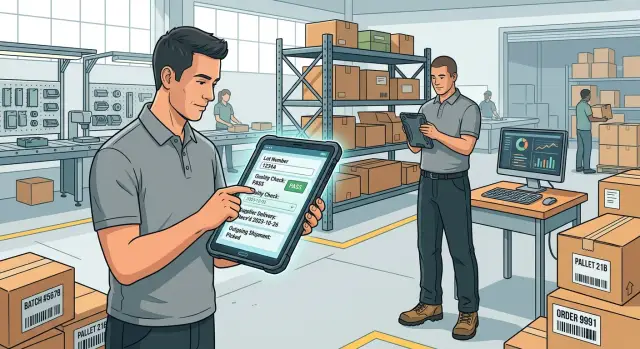
Why batch records break down on the shop floor
A batch record often begins as a paper sheet beside the mixer, a delivery note in receiving, and a spreadsheet in the office. Each record makes sense on its own. Together, they leave gaps.
One operator writes a lot number by hand. Another records a temperature check on a clipboard. Purchasing keeps supplier details in an email thread, while shipping records the customer order in a separate system. Verbal handoffs fill the space between them until the person who received the handoff is away or remembers it differently.
Handwritten notes create another problem. A smudged digit can turn lot "L24071" into "L24017." A spreadsheet row can end up in the wrong tab. These ordinary errors make manufacturing lot tracking slow when someone needs an answer quickly.
When a customer reports an issue, staff need to trace the product in both directions. They need to know which finished batch reached the customer and when it shipped, which ingredients or materials went into it, who completed each production and quality check, and whether stock from the same batch remains in the warehouse or went to other customers.
If this information lives in several places, a simple complaint becomes a search project. Someone checks shipping paperwork, calls the production lead, opens old spreadsheets, and tries to match dates with supplier deliveries. That can take hours and pulls people away from production at the worst time.
The cost rises after stock has shipped. Without clear supplier and shipment tracking, a team may hold or contact every customer who bought a similar product because it cannot isolate the affected lot. That creates waste, lost sales, and awkward customer calls. Missing stock that belongs to the affected batch is worse.
A batch traceability app puts those records around one batch ID. Staff on the floor can scan or enter that ID, add a check, record material use, and confirm the next handoff while the work happens. The record then reflects the actual day instead of a reconstruction after a problem appears.
What each batch record should contain
A batch, also called a lot, is a group of items received or made together under the same conditions. It might be one pallet of flour from a supplier, 500 bottles filled during a morning run, or a tray of parts made on one machine shift. The definition should fit how the factory works, not how a spreadsheet is arranged.
Each batch needs its own ID. Staff should see that ID on the receiving record, production screen, check sheet, label, and shipment record. A batch traceability app works best when people can search one ID and see the full story without opening several files.
The record should connect the supplier delivery, material lot, production run, quality checks, and customer shipments. Record the supplier name, purchase order, arrival date, and received quantity. Keep the supplier lot number, expiry date when relevant, and storage location with the material lot. For the production run, include the finished-goods lot number, recipe or process, line or machine, and quantities made. Quality records should show the inspection or test, result, reading where needed, and the action after a failed check. Shipment records need the customer, dispatch date, quantity sent, and finished lot that left the site.
Connections matter more than long notes. If a customer reports a problem with one carton, staff should identify the shipment, find its finished lot, then see every input material lot used in that run. They should also see where else that finished lot went.
Every entry needs three basic details: a date and time, the staff member who made the entry, and a current status. Dates put events in the right order. Named staff members give supervisors someone to ask when a reading looks unusual. Status tells everyone whether the batch is received, waiting for a check, approved, on hold, used in production, shipped, or closed.
Keep statuses plain and limited. A floor worker should not need to choose between "pending review," "under review," and "awaiting approval" when all three mean the same thing. One clear "on hold" status prevents material from moving before someone resolves an issue.
Add attachments only when they prove a record. A photo of a damaged delivery label, a supplier certificate, or a signed inspection sheet can sit with the batch. Keep those files attached to the lot rather than buried in an email inbox.
For example, a sauce maker receives tomatoes in supplier lot T-184. The team records the delivery, uses T-184 in finished batch S-0624, logs the cooking temperature check, and ships S-0624 to two customers. That chain gives the manufacturer a usable answer when a supplier or customer calls.
Set up lot numbers from receiving to production
A lot number only works if staff can read it, say it, and type it without stopping their work. Keep the format short and consistent. A practical choice is YYMMDD-MAT-### for received materials, such as 250614-FLR-002, where the middle code identifies flour and the final number separates deliveries on the same day.
Avoid codes that require staff to look up several rules. The number should identify one physical delivery or defined production run, not every detail about it. Your batch traceability app can store the extra facts behind that simple label.
At receiving, staff should create a material lot record before the material goes into storage or reaches the floor. Capture the internal material lot number, the supplier's lot number, supplier name, delivery date, purchase reference, material name, quantity received, unit of measure, expiry or best-before date when relevant, and the receiving result: accepted, held, or rejected.
For example, a bakery receives two flour deliveries on June 14. Even if both shipments come from the same supplier, each delivery gets its own internal lot number. If one supplier lot later causes a complaint, the team can find every production batch that used it.
Create the production batch before staff mix, cut, cook, pack, or assemble anything. Give that run its own number, such as 250614-COOKIE-01. The record should show the product name, planned quantity, production date, shift, and the person who started it.
Staff then attach each material lot used to the production batch. They should select the lot from the received inventory list rather than type a fresh description. This prevents small spelling differences such as "Flour 25kg" and "25 kg flour" from splitting the history into separate records.
A production batch may use several material lots. If the team finishes one flour sack and opens another, they should add both lots and record the amount used from each. During a recall, the business can isolate the affected finished goods instead of treating the entire day's output as suspect.
Keep the receiving and production screens simple enough for a tablet on the floor. A Koder.ai app can guide staff through chat-based workflows while keeping lot relationships in one searchable record.
Build the workflow around daily work
A batch traceability app works when it follows the order people already use, rather than asking staff to translate their work into office language. Watch a delivery arrive, materials move into production, checks take place, finished goods get packed, and orders leave the site. Those handoffs should shape the app.
A typical workflow starts when a receiver logs the supplier, delivery date, supplier lot number, quantity, and storage location. A production operator selects the material lots used and starts a production batch. A supervisor records required checks and decides whether the batch can move forward. Packing staff confirm the finished batch, pack date, and quantity packed. Dispatch staff connect the batch to a customer order and shipment reference.
Give each handoff its own record and fixed fields. A worker should select a supplier from a list, scan or enter a lot number, choose a check result, and add a quantity. Free-form notes still help with unusual events, such as a damaged pallet or temperature issue, but they should not hold information you need to search later.
Keep screens short. A person beside a line or packing bench should see the current job, a few required fields, and one clear save action. Split a long form into small steps if the work happens at different times. Production can start a batch in the morning, quality can add results after testing, and dispatch can finish the shipment record that afternoon.
Use labels that match the words staff use. "Supplier lot," "our batch," "checked by," and "released for packing" cause less confusion than vague labels such as "reference" or "status." Show only fields that apply to the current task. A dispatch screen does not need receiving details on every visit.
Choose ownership before people begin using the app. Receiving staff can create delivery records, operators can add production quantities, quality staff can approve or reject checks, and dispatch staff can attach shipment details. Let managers correct mistakes, but require a reason for changes after approval so the team can understand why a record changed.
Koder.ai can help a small manufacturer build this kind of flow through chat, then adjust the screens as staff use them. Start with one product line and one shift. If workers can update records without leaving the floor for more than a minute, the process is likely to stick.
Record a batch step by step
Staff need a record that follows the work, not a form they complete at the end of a shift. Each entry should take a minute or two and show who entered it, when they entered it, and which batch it affects. A batch traceability app works best on a tablet or phone beside the line.
-
Create a receiving entry as materials arrive. Record the supplier, delivery date, supplier lot number, internal lot number, quantity, and expiry date where relevant. Staff should also record a quick receiving check, such as damaged cartons or a missing certificate. If a delivery fails that check, mark the lot as on hold before anyone uses it.
-
Open a production batch when work begins. The operator selects the product, planned quantity, line or work area, and the material lots going into that run. The app should reject an expired, blocked, or depleted lot. This prevents a common traceability gap: knowing what you made but not which ingredients or parts went into it.
-
Add quality results as work moves forward. Use simple choices such as pass, fail, or hold, then ask for a reading or note only when staff need one. A food producer might record cooking temperature and pack weight, while a parts maker might record a dimension and visual inspection result. A failed check should stop the batch from moving to the next stage until a supervisor records the decision.
-
Close the batch and connect it to outgoing orders. Record the completed quantity, scrap, final release result, and any packaging lot used. When warehouse staff pick an order, they select the completed batch or batches placed on that shipment. The customer order, dispatch date, carrier reference, and destination then sit beside the batch history.
Keep corrections visible. If someone typed the wrong lot number, let them amend the entry with a reason instead of overwriting it. During a customer complaint or recall, staff can trace one shipped unit back through the finished batch, quality checks, and incoming supplier lots without searching through paper records.
Koder.ai can help a small manufacturer build this workflow around its own forms, approval rules, and screens, then export the source code if the business later needs a custom extension.
A simple example from one production day
At 7:00 a.m., a bakery receives 20 bags of flour from North Mill. Maya, the receiving clerk, checks the delivery note, counts the bags, and enters the supplier name, delivery date, and flour lot FM-240617 in the batch traceability app. She records that the flour passed its arrival check: bags were sealed, dry, and within their use-by date.
At 8:15, the baker opens 10 bags from FM-240617 for a morning run of seeded loaves. He creates production batch SL-0617-A, adds the flour lot, and records the other ingredients. He also enters the mixing time, oven temperature, and number of finished cartons: 48.
The team repeats the process after lunch with another 10 bags from the same flour lot. This time they create batch SL-0617-B and pack 44 cartons. A staff member checks loaf weight and label accuracy for both batches before packing. She records the results against each batch, along with her name and the check time.
At 2:30 p.m., the dispatch clerk sends 24 cartons from SL-0617-A to Green Street Shop and 24 cartons to Riverside Grocer. At 4:00 p.m., she sends the 44 cartons from SL-0617-B to Riverside Grocer. Each shipment entry includes the customer, carton count, dispatch time, and batch number.
Later that afternoon, a retained-sample test for SL-0617-B fails because the loaf moisture level is outside the bakery's limit. The supervisor opens that batch record and sees its flour lot, checks, and shipment history. The app shows that Riverside Grocer received all 44 cartons from the affected batch.
The supervisor then searches flour lot FM-240617. That search also finds SL-0617-A, because both runs used the same delivery. Green Street Shop and Riverside Grocer receive a call with the exact carton counts and batch numbers. Staff can hold the remaining stock, record the failed check, and document each customer contact before the shift ends.
Each person records one small action when it happens. Nobody needs to reconstruct the day later from paper notes, memory, or a chain of messages.
Mistakes that make traceability records unreliable
A batch traceability app only helps when people can trust the records during a busy shift. Small gaps, such as a misspelled lot name or a shipment logged before approval, can turn a simple recall check into hours of manual work.
Free text causes many of those gaps. If an operator types "Blue cap mix" instead of selecting the actual lot, the app cannot reliably connect that work to receiving records, quality checks, or customer orders. The screen should show only lots that exist and that the operator can use at that stage.
Put controls at the point of entry
Build rules into the form staff use on the floor. A clear selection list is faster than asking people to remember a long lot code, and it avoids naming differences that split one batch into several records.
A practical setup includes these checks:
- Staff select a lot from the receiving or production list instead of typing a product name.
- The app rejects a new lot number if that number already exists.
- Staff cannot confirm a shipment when the batch has a hold status.
- The app asks for a reason when someone corrects a quantity, test result, or supplier detail.
A hold must stop the shipping workflow, not merely display a warning that staff can ignore. For example, a quality lead may place lot L-2047 on hold after a failed moisture test. The warehouse team should see that status when they prepare an order, and the shipment button should remain unavailable until an authorized person releases the lot.
Separate spreadsheet files create another common problem. Receiving may assign a lot number in one file while production creates the same number in another. A shared lot register prevents that collision. Give the app one place where staff create lots, then let receiving, production, quality, and shipping use the same record.
Keep corrections visible
People make honest entry mistakes. The app should let them fix an error without erasing the history. When an operator changes a recorded weight from 240 kg to 204 kg, save both values, the correction reason, the person's name, and the time of the change.
This record protects staff and the business. A supervisor can see whether someone corrected a typo or changed a result after a quality issue. Keep permissions simple: allow routine corrections on the floor, but require approval for changes to released lots, failed checks, or completed shipments.
Quick checks before you rely on the system
A traceability app earns trust when staff can answer a recall question quickly during a normal shift, without searching through paper notes or asking several people. Test it with real records before you make it the source of truth.
Pick a finished lot from last week and ask a floor employee to find it by lot number. The record should open in a few seconds and show its status, production date, ingredients or components, checks, and shipment history. If people need a special filter or exact spelling, fix the search first.
Then trace the same lot backward. A supervisor should see the supplier lot for every incoming material used in that run. This matters when a supplier reports a problem with one delivered lot. Your team needs a short list of finished batches that may contain it, rather than a vague search across all production.
Test the shipment and hold process
Open a recent customer shipment. The shipment record must name every finished batch loaded for that customer, with quantities where your process needs them. A dispatch note that says only "50 cases shipped" does not support a focused withdrawal.
Run a practice quality failure as well. For example, record a failed seal check on batch PB-2406-18. The app should place that batch on hold, show why, and prevent staff from adding it to a shipment until an authorized person releases or disposes of it. Test whether the hold also appears when someone searches the lot from the floor.
Use this short review list:
- Staff can find a batch by its lot number without help.
- Each shipment identifies the batch or batches it contains.
- Each finished batch points back to the supplier lots used.
- A failed quality check changes the batch status to hold.
- Supervisors can see who edited a record, what changed, and when.
Check the record trail, not just the screen
Ask two employees to update a batch on different devices. Confirm that the app keeps both changes in the right order and records the user and time for each edit. An audit trail should retain the earlier entry rather than silently replacing it.
Also check everyday exceptions: a split batch, a corrected quantity, a returned shipment, and a supplier lot entered with a typo. Staff need a clear correction method that keeps the original history visible. If they work around the app when something unusual happens, manufacturing lot tracking will fail when you need it most.
A small test often exposes missing fields or confusing steps. Fix those problems with the people who receive materials, run production, inspect goods, and ship orders. Their routine use determines whether the records remain reliable.
Start with a small working version
Begin with one product line that follows a clear receiving-to-shipping path. Pick an item your team makes often, with a manageable number of ingredients or parts. A small batch traceability app should prove that people will enter records during a busy shift before you add every product, warehouse location, and exception.
Create only the records staff need to answer a recall question. A food producer might record the supplier lot for flour at receiving, assign a production lot when mixing begins, log the quality check after baking, and connect that lot to each customer shipment. That chain gives the team a useful first test of manufacturing lot tracking.
Ask the people who receive goods, run production, inspect batches, and pack orders to use the app during normal work. Watch where they pause or reach for paper. A field that no one uses creates friction and often leads to blank records later.
Keep the first version focused on four actions:
- Receive a supplier delivery and record its lot number.
- Create a production batch and attach the inputs used.
- Record pass or fail quality checks with the staff member and time.
- Confirm which customer shipments contain each finished lot.
After several days, review a completed batch with the team. Start with a shipment number and search backward to the finished lot, production record, and supplier delivery. Then start with a supplier lot and search forward to every affected batch and shipment. Time the exercise. If staff cannot find the full chain in a few minutes, fix the record fields or workflow before expanding the app.
Remove duplicate entries and vague choices such as "checked" or "okay." Quality check records need a clear result, a date and time, and enough context to explain what staff inspected. Add fields only when someone can explain how they use the answer in daily work or during a recall.
Koder.ai can help a team create a custom web or mobile traceability app through chat. Teams can use planning mode to map the first workflow, then deploy and host the app when it is ready for floor testing. Source code export gives the business a path to continue development outside the platform if its needs grow.
A narrow first release is easier to test honestly. Once one product line produces complete, searchable records, copy the pattern to the next line instead of rebuilding the process from scratch.
FAQ
What is a batch traceability app?
A batch traceability app connects supplier lots, production runs, quality checks, stock, and customer shipments under searchable batch IDs. When someone reports an issue, staff can trace a finished lot back to its inputs and forward to every customer who received it.
Why do small manufacturers need lot tracking?
Small manufacturers often keep receiving notes, production sheets, and shipping records in separate places. One shared record cuts the time spent matching paperwork during a complaint, withdrawal, or supplier alert.
How should we create lot numbers for received materials?
Give every physical supplier delivery its own internal lot ID, even when two deliveries arrive from the same supplier on the same day. Keep the format short, consistent, and easy to scan or type, such as 250614-FLR-002.
What should a receiving record include?
Record the supplier name, supplier lot number, delivery date, purchase reference, material name, quantity, unit of measure, storage location, and expiry date when relevant. Staff should also mark the delivery as accepted, held, or rejected before anyone uses it.
How do we link ingredients or parts to a production batch?
Create a finished batch before production starts, then attach every material lot used in that run. Record the product, date, shift, work area, planned and completed quantities, and the person who started the batch.
What happens when a quality check fails?
Use clear results such as pass, fail, or hold. Add readings only where the check needs them, such as cooking temperature, weight, dimensions, or seal quality. A failed result should place the batch on hold until an authorized person records a decision.
What shipment details do we need for a recall?
Each shipment should name the finished batch or batches loaded, the quantity from each batch, the customer, dispatch date, destination, and shipment reference. This lets staff contact only the customers affected by a specific lot.
Should staff be able to edit batch records after approval?
Let staff correct mistakes, but retain the original value, new value, reason, user name, and time of the change. Require manager approval for edits to released batches, failed checks, and completed shipments.
How should we start building a traceability app?
Start with one product line and four actions: receive a delivery, create a production batch, record quality checks, and attach batches to shipments. Test a backward and forward trace with real records before adding more products or exceptions.
Can Koder.ai help us build a custom batch traceability app?
Koder.ai lets a team describe the workflow through chat and create web or mobile screens for receiving, production, quality, and dispatch. Teams can test the app on the floor, deploy it, use custom domains, and export the source code if they later need custom development.