

Fleet vehicle defect reporting app: a practical plan
Learn how a fleet vehicle defect reporting app helps teams capture photos, set severity, track repairs, and follow up with drivers before routes.
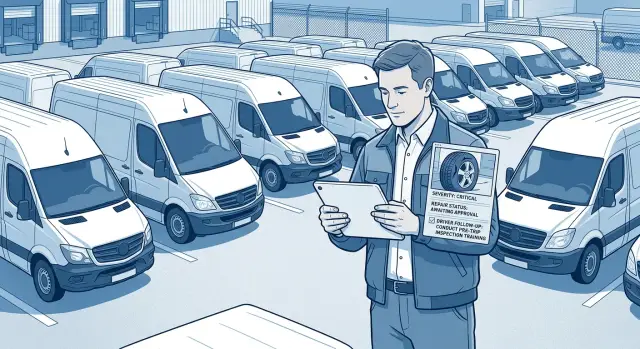
Why defect reports get missed
A driver notices a worn tire, a warning light, or a damaged mirror at the end of a shift. The problem might go on a paper form, in a text message, or into a quick call to the depot. Each method can work once, but using all of them makes defects easy to lose.
Paper forms sit in a cab or reach the office hours later. Calls rely on someone recording the details correctly. Messages disappear in busy group chats, often without a photo, vehicle number, or clear description. A manager may know that "a van has a brake issue" but not which van, who reported it, or whether it should go out again.
The delay affects more than maintenance. A driver can arrive for an early route and find that their assigned vehicle is unsafe or unavailable. Dispatch then has to find a replacement, change deliveries, and contact customers. If there is no spare vehicle, the route leaves late or does not leave at all.
Small faults can also worsen when a vehicle stays in service. Drivers need one simple place to record what they saw, attach evidence, and indicate urgency. They should not have to decide alone whether a defect is serious enough to mention.
A fleet vehicle defect reporting app keeps the details in one record. Managers can see the vehicle involved, the driver's notes, photos, severity, repair status, and the person responsible for the next action. That turns vehicle inspection reports into work people can follow through.
Instead of chasing paper, calls, and messages, managers can decide whether to hold a vehicle, book a repair, or approve it for the next route. Drivers also get a clear response, so they know their report did not disappear after they sent it.
What every defect report should capture
A reporting app only works if drivers can finish a report in a minute or two. Ask for enough detail to identify the problem and send the right person to fix it. A brake warning should not require a long form.
Every report needs these basics:
- Vehicle identifier, such as a fleet number or registration number
- Date and time the driver spotted the defect
- Defect type, such as tires, lights, brakes, body damage, or cabin equipment
- A short description in plain language
- One or more photos when the issue is visible
The description field should prompt useful details. Rather than asking drivers to "describe the problem," ask for the affected part, the side of the vehicle, and whether it still feels safe to drive. For example: "Rear left tire has a deep cut near the tread. Pressure looks low."
Add a simple severity choice to every report. Drivers do not need mechanical training to select "safe to use," "needs attention soon," or "do not drive." Set new reports to a status such as "new" so managers know they need review.
Location matters when vehicles work across several depots or spend the day on the road. Let drivers choose a depot, enter their current location, or select "away from depot." Maintenance staff can then arrange a repair where the vehicle is.
Keep optional fields off the first screen. Managers can add notes, assign a mechanic, and update repair status later. The driver's job is to report the defect accurately before leaving, not to complete maintenance paperwork.
Set severity levels people can use
Vague labels such as "minor" and "major" create arguments later. Use labels that tell drivers what to do with the vehicle and tell managers how quickly they need to respond.
For many fleets, three levels are enough:
- Urgent - stop and report now. The driver must not start or continue the route until a manager or qualified mechanic approves the vehicle. Examples include brake warnings, steering problems, a tire with visible damage, severe fluid leaks, or a broken mirror that limits visibility.
- Soon - report before the next planned shift. The vehicle may finish its current route if it remains safe, but a manager needs to arrange a check promptly. A persistent engine warning light, damaged door latch, or failed reversing camera can fit this category.
- Routine - log for scheduled attention. The vehicle can remain in service while the team adds the work to its maintenance plan. Low washer fluid, a worn floor mat, or a small trim issue fit here.
Put a short action beside each choice in the form. Drivers should not have to judge mechanical risk by themselves.
Assign ownership too. A duty manager should receive urgent reports immediately and confirm the driver's next step within a defined time, such as 15 minutes. A fleet manager or maintenance coordinator can review soon reports at least once per shift and book repairs. Routine reports can enter a daily or weekly maintenance review.
A warning light does not always mean the same thing. A red brake warning belongs in urgent, while a low washer fluid alert is routine. Clear guidance helps managers make the right call without asking drivers to diagnose faults.
Keep the guidance visible in the form, with brief examples and the required action. Koder.ai can help teams build a chat-created reporting app that routes each report to the right person and records its progress through to closure.
Build the reporting flow
Start with a vehicle register that drivers can search quickly. Use an identifier they already see every day, such as "Van 24," a registration number, or an internal asset code. Avoid nearly identical names that make the wrong choice easy.
Create categories around the faults your fleet actually sees. A delivery fleet might use tires, brakes, lights, body damage, mirrors, fluids, safety equipment, and cabin issues. Keep an "other" option, but require a short description when someone selects it.
Make reporting easy at the vehicle
A common report should take less than two minutes. The driver selects the vehicle and category, adds a description, chooses severity, and attaches a photo. Require a photo when damage is visible, such as a cracked mirror or worn tire.
Ask for useful detail rather than a long story. "Rear left tire loses pressure overnight" gives maintenance staff a place to start. The app can also record the driver's name, submission time, and current location automatically when company policy allows it.
A simple form order works well:
- Select the vehicle and defect category.
- Choose severity and describe the problem.
- Add photos or a short video if needed.
- Send the report to the assigned manager or maintenance team.
Route each report to someone
Choose who receives new driver defect reporting alerts. Smaller fleets may send every report to one manager. Larger teams can assign reports by depot, vehicle type, or category. A maintenance coordinator might handle mechanical faults while an operations manager makes route decisions.
Give each report a clear status: reported, reviewed, scheduled, in repair, ready for check, and closed. Every change should show who made it and when. That history stops a defect from disappearing into an inbox.
Before rollout, test the full path with one real vehicle. Submit a report with a photo, confirm the right person receives it, move it through each status, and make sure the driver receives the final update. The process only works when the loop closes before the vehicle returns to service.
Use photos to make defects clear
A note such as "tire looks low" leaves too much room for interpretation. A photo gives the manager and mechanic a shared view before anyone inspects the vehicle in person. It also records what the driver saw and when.
Photo prompts help drivers capture the right evidence. They are especially useful for visible faults that are hard to describe precisely:
- Tire wear, sidewall damage, and embedded objects
- Dents, cracked lights, and loose body panels
- Dashboard warning lights and error messages
- Fluid leaks below the vehicle or around the engine area
When it is safe to do so, ask for one wide photo and one close photo. The wide shot shows where the defect is. The close shot shows the detail a repair team needs, such as a split hose or nail in a tire. For a dashboard alert, the image should show the full display rather than a blurry crop of one icon.
Store images in the same record as the description, severity, vehicle ID, and submission time. Photos sent through personal messages lose context and are hard to find later. A manager should be able to open one report and see the full history.
Drivers should retain their original report after submission. Managers and mechanics can add repair notes, extra photos, and status updates in a separate activity log. For example, a driver may report a puddle under Van 24 with two photos. A mechanic can later add "replaced damaged coolant hose" and attach a photo of the completed work. The original report stays intact, which helps managers spot repeat issues.
Keep the photo step practical. Require images for high-severity defects, but let drivers explain when a photo is unsafe or impossible to take, such as in heavy traffic or poor weather.
Track repairs from report to closure
A defect report needs a clear outcome. Give every report a visible repair status so drivers, managers, and maintenance staff see the same information rather than relying on messages or memory.
Use stages that match how your fleet works:
- New: a driver submitted the report and it awaits review.
- Reviewed: a manager checked the details and made an initial decision.
- Booked: staff arranged a repair, inspection, or parts order.
- In repair: a mechanic or workshop is working on the vehicle.
- Completed: staff checked the work and closed the report.
Assign one named owner and a target date whenever a report needs action. The owner might be a fleet manager arranging a workshop booking or a maintenance coordinator ordering parts. A name prevents the common problem of everyone assuming someone else called the garage.
Record the decision at the review stage. Some defects need the vehicle taken out of service immediately, such as a damaged tire with exposed cords. Others may permit safe use until a booked repair, such as loose cabin trim. Record why the team made that decision, who approved it, and any limits placed on the driver.
Keep workshop notes, invoice or reference numbers, completion photos where useful, and the date a manager confirmed the repair with the original report. This creates a usable repair history instead of a closed ticket with no evidence behind it.
Do not hide completed reports. Keep them searchable by vehicle, defect type, date, and repair outcome. If the same warning light appears three times in two months, that history tells maintenance staff to investigate the cause rather than treating each report as an isolated event.
Close a report only after the owner confirms the repair and the driver can see that decision. That final check matters on the next route.
Keep drivers and managers in contact
A defect report should begin a conversation rather than disappear into a queue. Set reminders for reports that have not been reviewed within a sensible window, such as 30 minutes for a vehicle due out that day or by the next shift for a parked vehicle.
Send reminders to a named manager or shift supervisor, not a general inbox. An "awaiting review" status makes these reports easy to find.
Sometimes a photo shows that something is wrong but does not explain the fault. A dark image of a wheel may not show whether the tire is flat, damaged, or simply dirty. The manager should request missing details in the same report: where is the issue, when did the driver notice it, and does it affect safe driving?
Keep follow-up questions focused. Ask for one or two photos from another angle if needed, a description of any warning light or change in handling, and whether the vehicle can move safely or should stay parked. If the route schedule matters, give the driver a clear deadline to reply.
Drivers also need updates after submitting a report. Send a notification when staff change the status, such as "scheduled for repair," "waiting for parts," "vehicle off road," or "closed." State who made the change and whether the driver may use the vehicle on the next shift.
Record every follow-up in the report timeline, including the time, the person who asked or replied, the message, and attached photos. Shift supervisors can then see whether someone reviewed the issue, whether the driver answered, and why a repair remains open.
For example, a driver reports a cracked mirror at 4:40 p.m. The supervisor marks the vehicle off road, asks for a wider photo, and books a repair for the morning. The driver receives each update instead of arriving for the next shift unsure whether to take that van.
Example: a defect found before a delivery route
At 6:40 a.m., a delivery driver completes the normal walk-around before loading the van. She sees a crack across the driver's side mirror. The mirror still reflects part of the road, but the crack blocks a clear view of traffic approaching from behind.
She opens the reporting app, selects the vehicle, chooses "mirror" as the affected area, and writes: "Crack runs through the center of the driver's side mirror. Rear view is partly blocked."
The driver takes two photos. One shows the full mirror and its position on the van. The other shows the crack clearly. She marks the issue as needing prompt review and submits the report before leaving the depot.
The fleet manager receives the alert during the morning dispatch check. The photos make the issue clear, so the manager does not need to call the driver for an explanation or wait for a paper vehicle inspection report.
The manager books the van into a local repair slot later that day. Because the route includes busy roads and several reversing stops, the manager assigns a spare vehicle to the driver. The app records both decisions: the replacement vehicle for the route and the repair appointment for the damaged van.
After the repair shop replaces the mirror, the manager changes the status to "completed" and adds the invoice reference and completion time. A final photo of the new mirror gives the record a visual check. The driver receives confirmation that the van is ready for use.
This small reporting step prevents an avoidable safety issue, keeps the route moving, and leaves a clear repair history.
Mistakes that slow down repairs
Repairs often stall because a report leaves the manager guessing what failed, where it is, how urgent it is, and whether the driver can keep using the vehicle.
Long phone forms are a frequent problem. A driver finishing a shift is unlikely to write several paragraphs about a loose mirror or warning light. Ask for the vehicle ID, issue type, severity, a photo, and one optional note. A prompt such as "rear left brake light out" gives the workshop a better starting point than a blank text box.
Using one severity label for every problem causes another delay. If a missing washer fluid cap and a brake warning light both appear as "reported," managers must open every item and decide what to do. The queue quickly becomes noisy.
Use action-based choices such as stop use, repair soon, and monitor. Keep them visible in the app and add a short example beside each. Drivers do not need maintenance knowledge to choose a sensible category.
Do not close a report when someone assigns it to a mechanic. Assignment is not completion. Keep the report open until staff record what they repaired, who completed the work, and when the vehicle returned to service. If no repair is needed, record that decision too.
Personal chats and verbal handoffs also lose information. Put every update in the same report: assignment, appointment time, repair note, and closure. The driver can then see whether to use a replacement vehicle or return for the next route.
Quick checks before rollout
Test the app with real staff before asking the whole fleet to use it. Give one driver a phone, one manager the dispatch view, and one mechanic a repair task. Use a simple fault, such as a cracked mirror found during a morning walk-around, then identify where the process slows down.
A driver should complete a report in two or three minutes. They need to choose the vehicle, describe the issue in plain words, set a severity level, attach a photo, and submit it. Long menus and detailed diagnosis fields encourage people to delay reporting.
During a short trial, submit both a routine issue and an urgent safety issue. Confirm that each goes to the right person. Check that every report includes the vehicle ID, severity, photo, assigned owner, submission time, and current status. Ask the manager to find every open urgent defect before dispatch. That view should be available within seconds.
Also test follow-up messages. Record an instruction such as "Do not use Vehicle 24 until the mechanic checks the mirror," then confirm that the driver, supervisor, and maintenance team can see it. Complete the repair and search the vehicle history to make sure the original report, repair notes, and completion date appear together.
Check permissions as well. Drivers should report and view their own issues. Managers need a full fleet view. Mechanics need clear repair tasks but do not need access to unrelated driver details.
If you build the app in Koder.ai, test it on the phones drivers already use, not only on a desktop browser. A photo upload that works on office Wi-Fi can fail at a depot with weak signal. Where possible, save drafts locally and show a clear confirmation when the report reaches the manager.
Next steps for your fleet
Start with one depot or a small group of drivers for two or three weeks. A limited trial reveals unclear fields and missing defect types before every driver depends on the app.
Ask drivers to submit reports during their normal vehicle check rather than at the end of a shift. Review the first batch with them. If several people select "other" for the same fault, add a plain-language category. If drivers interpret severity labels differently, rewrite the guidance with examples that match your vehicles.
Managers should set a fixed time to review open issues. A 15-minute check each morning can cover new serious defects, repairs waiting for approval, and overdue work. Give every open report one named owner, even when an outside garage will complete the repair.
As the fleet grows, the reporting flow may need different fields for vans, trucks, trailers, or specialist equipment. Keep the driver form short while giving managers enough detail to assign work and confirm repairs.
Koder.ai lets teams create web, server, and mobile applications through chat, so a fleet can describe its report fields, severity rules, photo uploads, repair stages, and driver follow-ups in plain language. The workflow can then change as fleet maintenance tracking needs change.
Run the trial long enough to see reports through to closure. The useful measure is whether the team fixes urgent problems before the next route and can show when each vehicle was safe to return to service.
FAQ
What details should a driver include in a vehicle defect report?
Include the vehicle ID, time of discovery, defect category, a short plain-language description, severity, and photos when safe. Add the depot or current location if repairs may need to happen away from base.
What severity levels work best for fleet defects?
Use three action-based choices: urgent, needs attention soon, and routine. Each choice should tell the driver whether to stop using the vehicle, finish the current route safely, or log the issue for planned maintenance.
How many photos should a defect report require?
For visible damage, ask for one wide photo and one close photo when conditions are safe. The wide image shows where the problem is, while the close image shows details such as a crack, leak, or tire damage.
Who should receive urgent vehicle defect reports?
Urgent reports should alert a named duty manager straight away. That person needs to tell the driver whether to park the vehicle, use a spare, or wait for a mechanic within a set time, such as 15 minutes.
How do we track a defect from report to repair?
Keep one report open from submission through repair. Use clear statuses such as new, reviewed, booked, in repair, and completed, then record the owner, target date, repair notes, and final approval.
Should we close a report when we assign it to a mechanic?
No. Assignment only shows that someone has taken responsibility. Close the report after staff record the work completed, confirm the vehicle is safe to return to service, and notify the driver.
How can we make defect reporting quick for drivers?
Give drivers a short form that takes about two minutes: select the vehicle, choose a category and severity, add a note, attach a photo if needed, and submit. Avoid asking them to diagnose mechanical causes or fill in workshop fields.
Why should we avoid reporting defects through group chats?
Keep photos, notes, questions, repair updates, and decisions in the same record. Personal messages lose the vehicle context and make it hard for supervisors to see whether anyone reviewed or fixed the issue.
What follow-up should drivers receive after reporting a problem?
Managers should send an update whenever they review, schedule, hold, repair, or close a report. The update should name the decision maker and state whether the driver may use the vehicle on the next shift.
What should we test before rolling out a defect reporting app?
Run a small trial with a driver, manager, and mechanic. Submit both a routine issue and an urgent issue, check alert delivery and photo uploads, then confirm the team can find the repair history after closure.